
Most Amazon sellers check ACoS every morning like it's a stock ticker. If it's under 30%, they sleep easy. If it's above, panic mode.
Here's the problem: ACoS alone is a terrible compass for running a profitable Amazon business - and no amazon fba calculator will warn you about this. You need both metrics, and more importantly, you need to know which one to act on and when.
Let's get into it.
What ACoS and TACoS Actually Measure
ACoS (Advertising Cost of Sales) measures how much you're spending on ads relative to revenue generated directly from those ads.
Formula: ACoS = Ad Spend ÷ Ad Revenue × 100
If you spent $200 on ads and those ads generated $1,000 in sales, your ACoS is 20%.
TACoS (Total Advertising Cost of Sales) zooms out. It measures your ad spend against your total revenue - including organic sales that happen without clicks.
Formula: TACoS = Ad Spend ÷ Total Revenue × 100
Same $200 in ad spend, but your total revenue (ads + organic) is $2,500. TACoS = 8%.
That difference isn't cosmetic. It tells a completely different story about your business.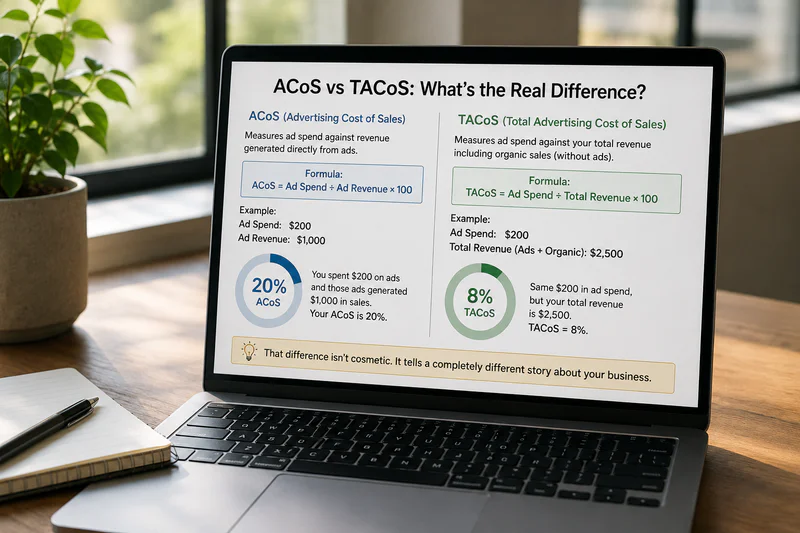
Why Optimizing Only for ACoS Is a Trap
Here's a scenario that plays out every day:
A seller is running Sponsored Products. ACoS sits at 22%. They push to lower it - pause low-converting keywords, tighten bids, cut spend. ACoS drops to 14%. They celebrate.
But total revenue tanks 35%. Why? Because those "low-converting" keywords were driving rank, which was pushing organic sales. Cut the ads, organic disappears too.
This is exactly what ACoS optimization misses. It only sees the ad-attributed slice. It has no visibility into how your ads affect the rest of your business.
Industry data shows that for most established Amazon listings, organic sales make up 50–70% of total revenue. If your ads are supporting that organic rank, your ACoS never captures the full value of what your campaigns are doing.
The Right Way to Use Both Metrics Together
Think of ACoS and TACoS as two different lenses:
ACoS tells you how efficient your ads are at the campaign level
TACoS tells you how dependent your overall business is on paid traffic
Here's a simple framework to decide which metric to prioritize:
Phase 1: New Product Launch (First 60–90 Days)
Watch ACoS, but don't obsess over it. Your job right now is to get sales velocity, build rank, and collect reviews. Running at 40–60% ACoS is normal and acceptable - you're paying to establish position.
The metric that matters: Is TACoS trending downward week over week? If yes, it means organic is kicking in. You're building something sustainable.
Phase 2: Growth Phase (3-12 Months)
Now ACoS starts to matter more. You should be targeting an ACoS at or below your break-even point.
Break-even ACoS = Your Net Margin %
This is where an amazon fba calculator becomes essential. Pull your actual FBA fees, referral fees, COGS, and storage costs. If your true margin after all fees is 28%, your break-even ACoS is 28%. Any ACoS above that means you're paying Amazon to sell for you at a loss.
Most categories run a healthy ACoS between 15–25%. But that number is meaningless without knowing your own margin.
Phase 3: Mature / Profitable Products
Here, TACoS becomes your primary dial. A healthy TACoS for a mature product typically sits between 8–12%. If you're above 15%, your business is too dependent on paid traffic - organic isn't pulling its weight, and you're exposed.
If TACoS is falling while ACoS holds steady or even rises slightly, that's a great sign. It means organic is growing faster than your ad spend. That's compounding.
The One Number Most Sellers Never Calculate
Your target ACoS - tied to your actual margin.
Most sellers guess at this. They pick 20% because they heard it somewhere. But the right number is your break-even ACoS, and it's specific to your product, category, and fulfillment model.
Use an amazon fba calculator to map out every cost layer:
Product cost (COGS)
FBA fulfillment fee (varies by size/weight - averages$3.80–$4.75 for standard-size items)
Referral fee (8–15% depending on category)
Storage fees (especially if you're holding 90+ days of inventory)
Returns rate (factor in 5–8% for categories like apparel or electronics)
Once you have your true margin, you have your break-even ACoS. Run ads below that number and you're profitable. Run above it and you better be in launch phase building rank.
When TACoS Tells You to Worry
Two TACoS signals that should make you stop and audit:
Signal 1: TACoS is rising alongside ACoS. You're spending more on ads, generating less organic, and the ratio is worsening. This is the bleed-out pattern. Cut spend, fix your listing, check your BSR.
Signal 2: TACoS has been flat for 3+ months. Organic isn't growing. Your ads are covering for a listing that isn't converting well enough to climb the ranks on its own. The fix isn't more ad spend - it's listing optimization: images, bullet points, review velocity.
The Two-Metric Dashboard Every Amazon Seller Should Use
Stop checking 15 metrics. Just track these two weekly:
Plot both over 8 weeks. The trend matters more than any single week's number.
Final Word
ACoS and TACoS aren't competitors - they're complements. ACoS tells you if your campaigns are efficient. TACoS tells you if your business is healthy.
If you've been running on ACoS alone, you've probably been making decisions with half the data. The other half is sitting right there in your total revenue numbers.
Run both. Know your break-even. Track the trend.
That's how you actually win at Amazon PPC.
Frequently Asked Questions
What is a good ACoS for Amazon FBA sellers?
A good ACoS depends entirely on your product's margin. Your break-even ACoS equals your net profit margin percentage - if your margin is 25%, any ACoS below 25% is profitable. Most healthy mature listings run between 15–22% ACoS. Use an Amazon FBA calculator to find your actual break-even before setting targets.
How is TACoS different from ACoS on Amazon?
ACoS only measures ad spend against revenue generated directly from ads. TACoS measures ad spend against total revenue - including organic sales. TACoS gives you a complete picture of how dependent your business is on paid advertising, which ACoS alone cannot show you.
Should I focus on ACoS or TACoS for a new Amazon product launch?
During a launch (first 60–90 days), track TACoS trends more closely. High ACoS is expected and acceptable while you're building rank and review velocity. What you want to see is TACoS declining week over week, which signals that organic traction is building alongside your ad spend.
How do I calculate break-even ACoS using an Amazon FBA calculator?
Enter your selling price, product cost, FBA fulfillment fees, referral fees, and any storage or return costs into an Amazon FBA calculator. The net margin percentage it outputs is your break-even ACoS. For example, if your true margin is 30%, your ads must stay below 30% ACoS to remain profitable.
What does a declining TACoS mean for my Amazon business?
A declining TACoS is a strong positive signal. It means your organic sales are growing faster than your ad spend - your ads are building rank and review velocity that converts without paid clicks. This is the compound growth effect every Amazon seller should be optimizing toward.