
You spent $2,000 on a designer. Got the lifestyle shots, the comparison chart, the brand story module - the whole A+ setup. Your listing looks premium. But your conversion rate? Exactly where it was 30 days ago. Maybe worse. Before judging whether it paid off, calculate your margin per unit so you know what each extra conversion is worth.
Sound familiar? That's because most Amazon sellers treat A+ Content like a checkbox. "Got it done." But never measure whether it actually moved the needle.
Every Amazon blog tells you A+ Content boosts conversion by 8–20%. Here's what nobody tells you - those are Amazon's self-reported numbers from their own marketing material. Not what sellers' actual session-to-order rates show after they go live.
I've worked with hundreds of brands across categories. Some saw real lifts. Some saw nothing. And a few actually saw conversion drop after adding A+ Content - because bad A+ is worse than no A+.
Let me show you real Amazon A+ Content examples that work, the ones that don't, and a framework to decide whether A+ Content is even worth your time right now.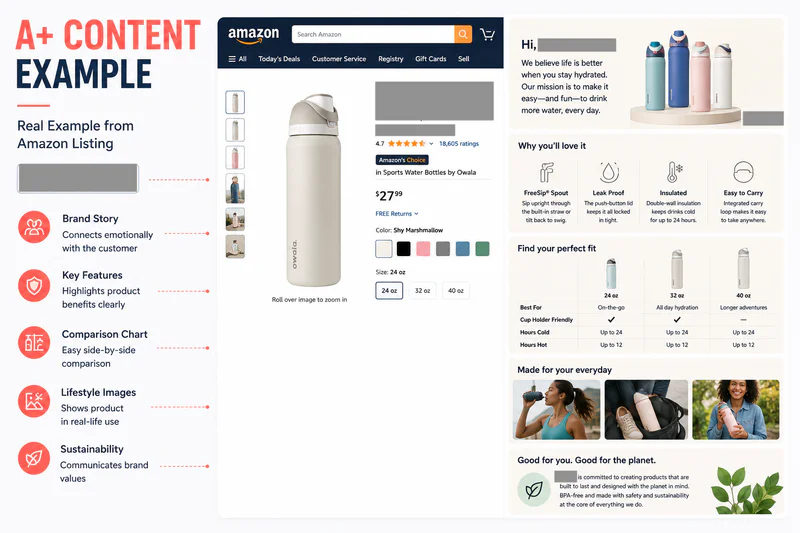
What Is Amazon A+ Content? (The 30-Second Version)
A+ Content - formerly Enhanced Brand Content (EBC) - lets Brand Registered sellers replace the basic product description with rich media modules: lifestyle images, comparison charts, brand story banners, and formatted text blocks.
You get up to five modules for Basic A+ and up to seven modules for Premium A+ Content. It sits below the fold on your product detail page, under the "From the brand" or "Product Description" section.
Here's the important part most guides skip: A+ Content is not indexed by Amazon's A9 search algorithm for keyword ranking. Its job is purely conversion - turning visitors who already found your listing into buyers.
The Real Conversion Numbers - Not Amazon's Marketing Pitch
Amazon claims A+ Content drives "up to 8% more sales" for Basic and "up to 20%" for Premium. Those numbers get copy-pasted across every blog on the internet. Here's the problem - they're averages that include brands going from zero description to a polished A+ layout. Of course that lifts conversion.
The honest benchmarks I use with brands:
The takeaway: A+ Content's impact is inversely proportional to how good your existing listing already is. If your main images and bullet points are already dialed in, A+ adds single-digit lift at best.
Amazon A+ Content Examples That Actually Convert
Let me break down specific A+ Content examples by category - because what works for supplements is completely different from what works for electronics or home goods.
Example 1: Supplements — Trust Modules Win
The best-performing supplement A+ layouts I've seen follow this exact module sequence:
Hero banner - lifestyle shot of the target demographic (not just the bottle)
Ingredient breakdown module - individual ingredient, what it does, clinical backing
Certification strip - GMP, third-party tested, FDA-registered facility logos
Comparison chart - your product vs. 2–3 of your own SKUs (not competitors)
Brand story module - founder story, "why we started this"
Why this works: Supplement buyers have trust anxiety. They're putting something in their body. Every module needs to reduce that anxiety. The brands that lead with "3x more absorption!" instead of third-party testing data consistently underperform.
Conversion lift seen: 5–8% when switching from generic A+ to this trust-first layout.
Example 2: Electronics — Spec Comparison Charts Dominate
For electronics, the A+ modules that move the needle are:
Hero image - product in-use, not on a white background
Technical specs module - dimensions, connectivity, battery life, compatibility
Comparison chart - your model lineup side by side (this is the money module)
Use-case gallery - 3–4 scenarios showing different applications
Q&A module (Premium) - top 5 questions pulled from your reviews section
Why this works: Electronics buyers are comparison shoppers. If your A+ doesn't have a clear spec comparison, they'll open 4 tabs and compare you against competitors themselves — and you lose control of the narrative.
Conversion lift seen: 4–7%, with the comparison chart alone accounting for most of it.
Example 3: Beauty & Personal Care - Lifestyle-Heavy Imagery
Beauty is an emotional purchase. The winning A+ formula:
Full-width lifestyle banner - aspirational, not clinical
Texture/application close-ups - show the product on skin, in hand
Before/after or routine sequence - step 1, step 2, step 3 visual flow
Ingredient spotlight - 3 hero ingredients with benefits
Social proof strip - quote from reviews or press mentions
Why this works: Beauty shoppers want to see themselves using the product. Stock photos kill conversion in this category. The brands using real-world, UGC-style photography in their A+ consistently outperform polished studio shots.
Conversion lift seen: 6–10% when imagery feels authentic rather than corporate.
Example 4: Home & Kitchen - Scale and Context Matter
Home products have a unique challenge - customers can't touch or measure them. The best A+ layouts solve this:
Room context shot - product in a real room setting, not floating in space
Scale/dimension module - product next to common reference objects
Material and build quality close-ups - texture, stitching, finish details
Multi-use showcase - same product, 3–4 different use cases
Comparison chart - size variants or color options
Why this works: Returns in home & kitchen are brutal - often 15–25%. A+ Content that sets accurate expectations reduces returnsand improves conversion simultaneously. When a customer knows exactly what they're getting, they click "Buy" with more confidence.
Conversion lift seen: 3–6%, but the bigger win is a 10–15% reduction in returns.
The Listing Conversion Stack - Where A+ Content Actually Fits
Here's what nobody tells you: A+ Content is not the most important part of your listing. Not even close. Think of your listing as a conversion stack:
Read that again. Only 20–35% of shoppers scroll far enough to even see your A+ Content. On mobile - where over 60% of Amazon traffic now comes from - the number is even lower.
This doesn't mean A+ Content is worthless. It means this: if you're investing in A+ before your main images and bullets are airtight, you're decorating a house with a broken foundation.
The right order of operations:
Main image (this is 80% of the click-through battle)
Secondary images and image gallery
Bullet points - objection handling, key specs, differentiation
A+ Content - brand story, social proof, category-specific deep dive
I've seen sellers pour $3,000 into Premium A+ Content while their main image was a blurry phone photo. That's not strategy. That's misallocation. Want to understand which parts of your listing are actually driving - or killing - profit? Start with your profit margin fundamentals.
5 A+ Content Mistakes That Kill Conversion
Most A+ guides tell you what to do. Nobody talks about what's actively hurting you. Here are the five most common A+ Content mistakes I see across US Amazon sellers:
Mistake 1: Walls of Text Nobody Reads
Your A+ Content is not your brand's autobiography. Shoppers are scanning, not reading. If a module has more than 3 sentences of body text, you've lost them. Use bullet fragments, bold headlines, and let images carry 70% of the message.
Mistake 2: Generic Stock Photography
If your lifestyle image looks like it could belong to any product in your category, it's not doing its job. The shopper's brain filters it as "ad noise." Custom product photography - even shot on an iPhone in real settings - outperforms polished stock photos in A+ Content nearly every time.
Mistake 3: Comparison Charts That Confuse
A comparison chart with 8 rows and 5 products is a spreadsheet, not a sales tool. The best comparison charts have 3–4 products and 4–5 key differentiating features. Highlight the recommended product. Make the choice obvious.
Mistake 4: Mobile-Hostile Layouts
Over 60% of Amazon sessions in the US are on mobile. That beautiful two-column layout with small text overlaid on images? Completely unreadable on a phone screen. Always preview on mobile first. If you have to pinch-zoom, you've failed.
Mistake 5: Brand Story That's Self-Centered
Nobody cares that you "started in a garage in 2019 with a passion for quality." That's every brand's story. A brand story that converts is one that names the specific problem your customer has and explains why you're uniquely qualified to solve it. Customer-first, not founder-first.
When A+ Content Does NOT Matter (The Honest Take)
Here's the part every A+ Content guide conveniently skips - because it doesn't help them sell design services.
A+ Content has minimal impact when:
You're selling a commodity product under $15. The shopper is buying on price, Prime badge, and delivery speed. They're not scrolling to your brand story for a $9.99 phone cable.
Your category is review-dominated. In categories like books, pet food, or baby products, review count and rating drive 80%+ of the conversion decision. A+ Content is a rounding error.
You have fewer than 15 reviews. At this stage, social proof is your bottleneck - not product storytelling. Focus on getting reviews first, A+ later.
Your product is an impulse buy. Low-consideration purchases ($10–$20, simple utility items) get decided in the image gallery. Most of these buyers never scroll past the bullets.
You're competing purely on price. If you're the cheapest option and that's your strategy, A+ Content won't change the buying calculus. The customer already decided on price.
A+ Content matters MOST when:
Your product is $40+ (higher consideration = more research)
You're in a trust-sensitive category (supplements, skincare, baby)
You have multiple variants and need a clear comparison
Your brand has a genuine differentiator worth communicating
You're competing against products with strong A+ Content already
Simple rule: the higher the price and the more complex the purchase decision, the more A+ Content matters.
Basic vs. Premium A+ Content: Is Premium Worth It?
Premium A+ Content (formerly A++) unlocks video, hover hotspots, clickable carousels, and Q&A modules. It's a significant step up. But here's what the comparison looks like in practice:
Is Premium worth it? If you're already eligible - absolutely. It's free and the video module alone can justify the effort. If you're not eligible yet, don't stress. A well-executed Basic A+ with strong custom imagery will still outperform a lazy Premium A+ every day.
Amazon made Premium A+ Content more accessible in 2024 - you need an active Brand Story on all ASINs and need to have published A+ Content for at least 5 ASINs in the past 12 months.
How to Create Amazon A+ Content (Step-by-Step)
If you're Brand Registered and ready to go, here's the process:
Log into Seller Central → Navigate to Advertising → A+ Content Manager
Click "Start creating A+ content" → Choose between Basic A+ or Brand Story
Name your project and select the language
Pick your modules - you get 17 module types to choose from. Use up to 5 (Basic) or 7 (Premium)
Upload images - stay under 2MB per image, use high-res product and lifestyle photography
Add copy - concise, benefit-driven, scannable. No keyword stuffing (Amazon explicitly prohibits it)
Assign ASINs - apply to individual products or bulk-apply across your catalog
Preview on desktop AND mobile - if anything looks off on mobile, fix it before submitting
Submit for review - Amazon's review takes 7–14 business days
Pro tip: Don't wait for approval to start tracking. Note your current conversion rate on the day you submit. Compare it to 14 days and 30 days after A+ Content goes live - not daily (you need data maturity), not monthly (too slow to act on).
Amazon A+ Content Guidelines You Cannot Ignore
Amazon will reject your A+ submission if you violate these rules. Don't waste 14 days on a resubmission:
No competitor mentions - you cannot name or reference competing brands
No pricing or promotion language - "on sale," "limited time," "best deal" are all prohibited
No shipping or fulfillment details - let Amazon handle that messaging
No external links or QR codes - everything stays within Amazon's ecosystem
No warranty or guarantee claims - no "100% satisfaction guaranteed"
No unsubstantiated health claims - you can't say your supplement "cures" or "treats" anything
Awards must include year and certifying body - "Award-winning!" alone gets rejected
No contact information - no email addresses, phone numbers, or social handles
Image alt-text is required - both for accessibility compliance and because Google crawls it for external search visibility
Getting rejected after 14 days of waiting is brutal. Follow these guidelines to the letter.
A+ Content and SEO: What You Need to Know
Here's a commonly misunderstood point: Amazon's A9 algorithm does NOT index A+ Content text for internal search ranking. Your A+ copy won't help you rank for keywords on Amazon.
However, A+ Content does impact SEO in two indirect ways:
Conversion rate lifts improve organic ranking. Amazon's algorithm heavily weights conversion. If A+ Content increases your session-to-order rate, your organic position improves — which drives more traffic. It's a flywheel.
Google indexes A+ Content. Unlike Amazon's internal search, Google crawls A+ text and image alt-text. This can drive external traffic to your listing from Google Shopping and organic results.
So while you shouldn't stuff keywords into A+ Content (Amazon may reject it), writing naturally keyword-rich copy helps your Google visibility. Include your primary keyword - "Amazon A+ Content" - in at least one header and naturally throughout your module text.
If you're already running ads to your listing, A+ Content amplifies that investment. Higher conversion rate means lower effective ACoS on every click. If you're spending on PPC, you need to understand how advertising impacts your P&L - not just your top-line revenue.
The A+ Content Decision Framework
Before you spend time or money on A+ Content, run through this checklist:
Are your main images optimized? If no - start there. This is 10x more impactful than A+.
Are your bullet points clear, benefit-driven, and complete? If no - fix those first.
Do you have at least 15+ reviews with a 4.0+ rating? If no - focus on review velocity. A+ won't overcome a 3.2-star rating.
Is your product above $25? Below that, A+ Content's impact is marginal for most categories.
Are your competitors using A+ Content? If yes - you need parity at minimum. If no - this is your competitive edge.
If you checked yes to all five, A+ Content should be a priority. If you checked no to 1 or 2, fix those first - they'll deliver more conversion lift per dollar spent.
Track the actual impact. Note your conversion rate before A+ goes live. Measure again at 14 days and 30 days post-launch. If it didn't move, the problem likely isn't A+ - it's upstream in your listing or your traffic quality from your advertising strategy.
That's exactly what Sellerview is built for. Not another dashboard. Actual visibility into whether your listing changes - including A+ Content - are moving the numbers that matter: conversion, margin, and real profit after all fees.
Stop guessing. Start measuring.