
Your Amazon Calculator Shows Monthly Storage Fees. It Does Not Show What Happens at Day 181.
You checked your storage fees in the Amazon calculator. $0.78 per cubic foot for standard-size off-peak. You thought you had time. You would deal with the slow-moving SKU next month. Most calculators stop at referral and fulfillment. Run the full fee breakdown to see what a unit really earns once ads and returns are in.
That calculation just cost you more than you think.
Amazon replaced the old long-term storage fee - the one that kicked in at 365 days and gave you almost a full year to act - with the Aged Inventory Surcharge. It starts at 181 days. Not 365. Not 270. Day 181. And your standard Amazon calculator does not show this fee in its estimates.
The math gets brutal fast. A product with 10 cubic feet of inventory hits the 181-day mark and your cost goes from $7.80/month in storage fees to $12.80/month. By day 275, that same product costs $22.80/month. By day 366, it costs $76.80/month - 10x what you were paying for the same inventory just 6 months earlier. Sellers who react to aging inventory save an average of 30% in fees compared to those who wait.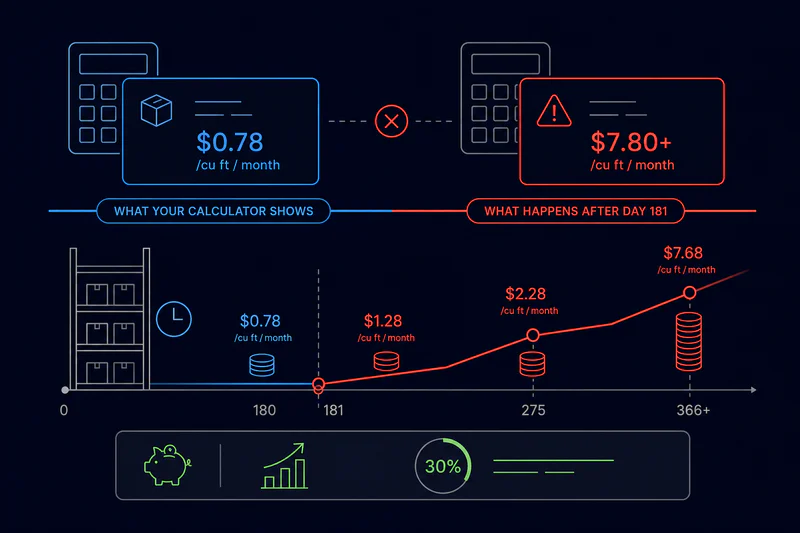
Why Your Amazon Calculator Is Showing You the Wrong Number on Slow-Moving Inventory
Most Amazon calculator tools - including the free Revenue Calculator in Seller Central - calculate storage fees using standard monthly rates. They show you $0.78/cubic foot (off-peak) or $2.40/cubic foot (Q4 peak) and call it done.
What they do not show you: the Aged Inventory Surcharge that stacks on top of those fees once inventory crosses 181 days. This is not a replacement for monthly storage - it is an additional charge. You pay both.
The old mental model was: I have 12 months before long-term storage fees hit. The new reality is: I have 6 months. That 90-day shift - from 271 days to 181 days - is the single most dangerous calculation error in FBA inventory planning right now. Sellers who built their models on the old 270-day or 365-day threshold are still getting blindsided.
Amazon evaluates inventory age on the 15th of each month. To avoid the 181-day surcharge, you must sell through or remove the inventory before the 15th of the month when items reach 179 days. Not 181. 179.
The 2026 Aged Inventory Surcharge Rate Structure - What Your Amazon Calculator Should Show
Here is the full 2026 AIS rate structure. These rates apply in addition to regular monthly storage fees.
That 10-cubic-foot example represents roughly 100 units of a standard-size product. At day 366, you are paying $76.80 per month to store inventory that was costing you $7.80. If the product only sells for $12 and is not moving, you are losing money just by holding it - before COGS, before ad spend, before anything else.
The Amazon Calculator Default Missed the Q4 Compounding Problem
If your slow-moving inventory hits the 181-day mark during Q4 (October 15 to January 14), you pay both the aged inventory surcharge and the Q4 peak storage rate of $2.40 per cubic foot. Your 10-cubic-foot product that would cost $7.80 off-peak in regular storage now costs $24.00 in Q4 storage plus $5.00 in AIS. That is $29.00 per month - nearly 4x the off-peak base rate. Most Amazon calculator tools do not model this overlap. You have to calculate it manually or use a tool that pulls your actual Payments data.
When Aged Inventory Is Expensive But Still Worth Holding
Not every slow-moving SKU that approaches 181 days should be liquidated or removed. The calculation depends on two variables your Amazon calculator handles independently: the surcharge cost vs the liquidation or removal cost vs the expected sell-through value.
Here is the decision framework:
• If remaining sell-through at current velocity covers the surcharge within 60 days: Hold. Calculate months-of-supply from your current sales rate and compare against the escalating fee schedule.
• If inventory is approaching 271 days with no velocity: Remove at $0.97-$2.37 per standard unit. Cheaper than paying $1.50/cu ft/month surcharge on stagnant stock.
• If inventory is past 300 days: Liquidate at 5-15% of your cost. Accept the loss. Continuing to hold past 365 days at $6.90/cu ft costs more per month than most liquidation recoveries.
• If the SKU has strong seasonal velocity 90 days out: Factor the expected sell-through against the months of surcharge you will pay before the seasonal spike arrives. Sometimes holding is still profitable.
The key question is not "should I pay the surcharge." The question is: what is the surcharge going to cost me in total before this inventory clears, versus what I recover by removing or liquidating now. Your Amazon calculator will not answer this without live inventory age data layered in.
5 Steps to Avoid Aged Inventory Surcharges Before They Hit
Step 1: Set a 150-Day Alert, Not a 181-Day Alert
Amazon evaluates inventory on the 15th. If you wait until day 181 to act, you have already missed the window. Set your aged inventory alert at 150 days. That gives you 31 days to run a clearance promotion, adjust price, increase ad spend on the specific ASIN, or submit a removal order before the surcharge clock starts. Pull the Aged Inventory report from Seller Central: Reports > Fulfillment > Inventory > Inventory Age.
Step 2: Run a Price Test 60 Days Before the Threshold
If a SKU is moving slowly at its current price, a 10-15% price reduction tested at 120 days often generates enough velocity to clear stock before the 181-day mark. Calculate the margin impact of the price cut vs the margin impact of paying the surcharge. On a product earning $6 per unit at current price, a $1.50 price reduction that doubles velocity and clears stock in 45 days costs you less than $0.50/cu ft/month in surcharges across multiple months.
Step 3: Run Targeted Ads on Slow-Moving ASINs at 120 Days
Do not wait for organic velocity to improve on aged stock. At 120 days, run a targeted Sponsored Products campaign on the slow-moving ASIN with a 15-20% TACoS cap. The goal is sell-through before day 181, not profit optimization. Margin on the ad spend is secondary to avoiding the surcharge escalation. Calculate your break-even: if the surcharge will cost $30 over the next 3 months, spending $15 in ads to clear the inventory is a net win even at zero profit per unit.
Step 4: Use FBA Liquidations for Stock Above 150 Days With No Velocity
Amazon FBA Liquidations recover 5-15% of your cost - better than the 0% recovery on inventory you keep paying to store and eventually write off. If a SKU at 160 days has shown no sales in 30 days and no price drop has moved it, initiate liquidation. Recovery is low, but you stop the fee escalation clock and free up cash flow.
Step 5: Do Not Restock Slow-Moving SKUs While Existing Units Are Still Aging
This one sounds obvious. It is not. Most sellers send restocks for SKUs that show low inventory - without checking whether the low inventory signal is because the SKU is selling or because old stock is sitting at 140+ days and about to cross the threshold. Before any restock decision, check inventory age in the Aged Inventory report. If units are approaching 150 days and velocity is below 30-day supply, do not restock. Liquidate first.
sellerview.ai tracks inventory age per ASIN automatically alongside your FBA fees and net margin. When any SKU approaches the 150-day mark, you see it before the surcharge triggers - without pulling the Aged Inventory report manually every week.
Your Amazon Calculator Shows What Storage Costs. Aged Inventory Shows What Inaction Costs.
The monthly storage fee your Amazon calculator shows is not the real cost of slow-moving inventory. The real cost is the compounding surcharge that starts at day 181 and escalates to $6.90 per cubic foot by day 365 - on top of everything else you are already paying.
The 90-day shift from 270 days to 181 days changed the economics of holding slow stock fundamentally. Sellers who built their models on the old timeline are getting hit by fees they did not plan for. The fix is simple: 150-day alert, proactive clearance, and no restocking of aging inventory until existing units are clear.
Every month you wait on aged inventory is another month on the escalating fee schedule. The Amazon calculator gave you a starting number. The aged inventory surcharge table shows you where procrastination ends up.
sellerview.ai tracks your inventory age and fee exposure per ASIN automatically - before the 181-day clock starts running. See your real storage costs
free to start : Sellerview.ai
FAQ: Amazon Calculator and Aged Inventory Surcharge 2026
What is the Amazon aged inventory surcharge and when does it start in 2026?
The Aged Inventory Surcharge (AIS) is an additional fee Amazon charges on top of monthly storage fees for inventory that has been in FBA for more than 180 days. In 2026, the surcharge starts at $0.50 per cubic foot per month at day 181, rises to $1.50 per cubic foot at day 271, and reaches $6.90 per cubic foot (or $0.15 per unit, whichever is greater) at day 365+. Amazon replaced the old Long-Term Storage Fee that kicked in at 365 days with this tiered structure that starts 90 days earlier.
Why does my Amazon calculator not show the aged inventory surcharge?
Most Amazon calculator tools - including Amazon's free Revenue Calculator - calculate storage costs using standard monthly rates only. The Aged Inventory Surcharge is a conditional fee that only applies once inventory crosses 181 days, so it does not appear in pre-launch profit estimates. To see real AIS exposure, you need to pull the Inventory Age report from Seller Central and calculate the surcharge manually for each ASIN approaching the threshold, or use a tool that tracks inventory age automatically.
How do I avoid the Amazon aged inventory surcharge?
Set a 150-day inventory age alert - not 181 - because Amazon evaluates inventory on the 15th of each month and you need time to act. At 120-150 days, run a targeted price test (10-15% price reduction), increase Sponsored Products spend on the ASIN with a clear TACoS cap, or initiate FBA Liquidations to recover 5-15% of cost. If velocity is zero and the SKU is past 150 days, submit a removal order at $0.97-$2.37 per standard unit - cheaper than paying escalating surcharges on stock that will not move.
What is the cheapest way to get rid of aging Amazon FBA inventory?
FBA Liquidations recover 5-15% of product cost and stop the AIS fee clock immediately. For small volumes, a removal order ($0.97-$2.37 per standard unit) is often the fastest option. A clearance price drop of 15-25% can generate enough sell-through to clear stock before the 181-day threshold if there is some residual demand - this is the best option if it avoids the surcharge entirely and recovers more than liquidation. Never hold inventory past 300 days waiting for a seasonal rebound unless you have calculated the total surcharge cost against the expected recovery margin.
How does the Amazon aged inventory surcharge interact with Q4 storage fees?
If your inventory crosses the 181-day threshold during Q4 (October 15 to January 14), you pay both the Q4 peak storage rate ($2.40 per cubic foot for standard-size) and the Aged Inventory Surcharge ($0.50 per cubic foot) simultaneously. For a 10-cubic-foot product, that is $29.00 per month - nearly 4x the off-peak base rate and roughly 2.5x the standard AIS rate outside of Q4. Any inventory approaching 150 days before August should be cleared or removed before Q4 peak rates begin to avoid this compounding effect.