
Your Amazon Calculator Shows Profit Per Unit. It Does Not Show When You Break Even
Your amazon calculator showed $6.40 net profit per unit at your target sell price. You ordered 500 units. You launched with $2,000 in ad spend in the first 30 days. You are selling 80 units per month.
You feel like things are working. But your bank account disagrees.
Here is what most sellers miss: the amazon calculator tells you what you earn on each sale. It does not tell you how many sales you need to earn back what you spent to get to the first sale. Those are two different calculations - and only the second one tells you whether your launch is actually recovering your investment or just generating revenue on a product that is still technically losing money.
After working with 300+ Amazon brands across categories like Home & Kitchen, Beauty, and Electronics, the pattern is always the same: sellers celebrate velocity without tracking recovery. Break-even units gives you the number that connects your amazon calculator output to real cash flow management.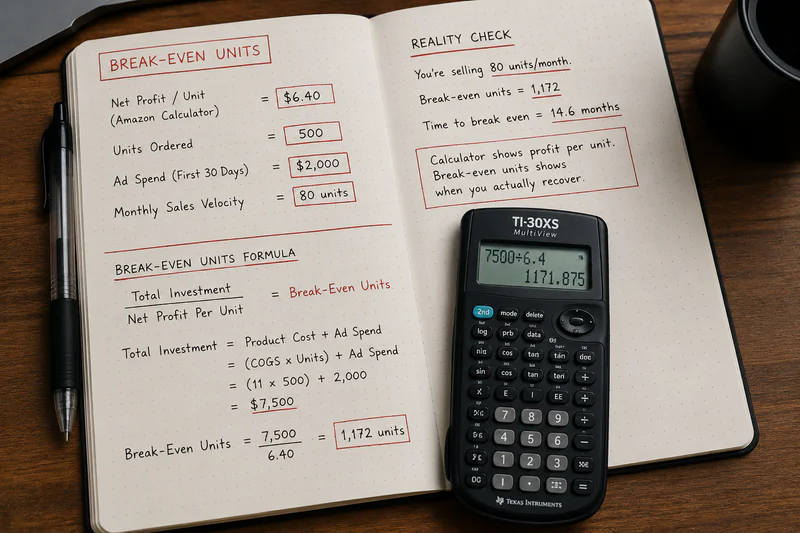
What Is Break-Even Units Sold for Amazon FBA?
Break-even units sold is the number of units an Amazon FBA seller must sell before total revenue from a product covers all costs - fixed launch investment plus variable per-unit costs - resulting in zero profit or loss. Your amazon calculator gives you the per-unit profit after variable costs. Break-even units extends that to include the fixed costs of getting the product to market.
Why Your Amazon Calculator Does Not Show You Break-Even Units by Default
The amazon calculator - whether Amazon's free Revenue Calculator or any third-party tool - calculates per-unit economics. Selling price minus fees minus COGS equals per-unit profit. That is a variable cost model.
Break-even analysis adds the fixed cost layer. Fixed costs are the costs you pay once, regardless of how many units you sell:
• Total inventory purchase cost (MOQ x landed COGS)
• Launch advertising spend in the first 30-60 days before organic velocity builds
• Inbound shipping cost to Amazon FCA
• Any product photography, listing creation, or brand setup costs
These costs exist whether you sell 1 unit or 500 units. Your amazon calculator does not know your MOQ, your launch ad budget, or your inbound freight total. You have to add them separately to find your real break-even point.
Your amazon calculator output is the denominator in the break-even calculation. Your fixed launch investment is the numerator. Break-even units = fixed costs / contribution margin per unit.
The 3-Part Formula: How to Calculate Break-Even Units Using Your Amazon Calculator
Part 1: What are my total fixed launch costs?
Fixed launch costs are everything you spend before a single sale. Add these up:
Note: Inbound shipping may already be included in your landed COGS. If it is, do not double count it. If you calculated COGS as factory price only and are adding shipping separately, include it here.
Part 2: What is my contribution margin per unit from the amazon calculator?
Contribution margin per unit is what each sale contributes toward recovering your fixed costs. It is your amazon calculator's net profit per unit - but only after all variable costs are deducted. Variable costs are costs you pay per unit sold.
For a $36 product in Home & Kitchen with a $14 landed COGS:
Important: Do not include launch ad spend in the variable cost stack here. Launch ad spend is a fixed cost in this model - you are spending it regardless of individual unit outcomes in the first 30-60 days. After break-even, ongoing TACoS-based ad spend becomes variable and appears in your steady-state margin.
See where your product sits against these benchmarks — calculate your real contribution margin on Sellerview.ai.
Part 3: What is my break-even unit count?
Break-even units = Total Fixed Launch Investment / Contribution Margin Per Unit
Using the example: $9,300 / $10.93 = 851 units.
You need to sell 851 units before this product fully recovers its launch investment. At 80 units per month, that is 10.6 months to break even. That is a problem. If your cash flow cannot support a 10-month recovery window on a $9,300 investment, you need to either reduce your launch fixed costs (smaller MOQ, lower initial ad budget) or increase your contribution margin per unit (better COGS, higher sell price, or lower return rate category).
If your contribution margin per unit were $18.50 instead of $10.93 - either from a lower COGS or a higher sell price - break-even drops to $9,300 / $18.50 = 503 units. At 80 units per month, that is 6.3 months. Still not ideal, but meaningfully different.
What Is a Healthy Break-Even Timeline Your Amazon Calculator Should Target?
Most successful sellers target break-even within 30-60 days of launch. Here is the benchmark table by category and sell price range:
These benchmarks assume a 500-unit initial order. Sellers who order 200 units at a higher per-unit COGS often break even faster in units but have lower contribution margin - meaning their steady-state profit is lower. The right MOQ is not the smallest possible order. It is the order size that produces a break-even point your cash flow can support.
Two Amazon Calculator Break-Even Numbers - Do Not Confuse Them
Break-even on the initial investment: How many total units you must sell to recover your full launch investment (MOQ + ads + setup). This is the number calculated by the formula above. It tells you when you stop losing money.
Break-even ACoS on ongoing ads: The maximum ACoS your product can sustain before each additional sale from ads loses money. This is a different calculation. Break-even ACoS = (Sell Price - Variable Costs excl. ad spend) / Sell Price x 100. For the same $36 product: ($36 - $25.07) / $36 = 30.4%. If your actual ACoS on ongoing campaigns exceeds 30.4%, each paid sale is losing money on a per-transaction basis - even if the product has cleared its initial investment break-even.
Most amazon calculator tools show neither of these. You have to calculate both manually before you can say a product is genuinely profitable on a cash basis.
How to Reduce Your Break-Even Units Without Reducing Your Selling Price
If your break-even calculation produces a number that requires more time than your cash flow allows, here are the levers - in order of impact:
• Reduce MOQ: A smaller initial order reduces fixed launch investment directly. On 200 units instead of 500 at $14 COGS, your inventory cost drops from $7,000 to $2,800 - a $4,200 reduction in break-even numerator.
• Reduce initial ad spend: Concentrate launch spend on the first 2-3 weeks rather than 60 days. A tighter, more targeted launch campaign at $800 instead of $1,500 cuts fixed costs by $700 and reduces break-even units by 64 units at a $10.93 contribution margin.
• Improve contribution margin: Lower landed COGS (better supplier negotiation, country diversification, or freight optimisation) increases contribution margin per unit. Every $1 reduction in COGS adds $1 to contribution margin and reduces break-even by approximately: $9,300 / ($10.93 + $1.00) = 779 units vs 851. That is 72 fewer units to break even.
• Use Amazon-optimized inbound splits: Removing the $0.40/unit placement fee by using multi-location splits adds $0.40 to contribution margin per unit and reduces break-even on a 500-unit order by $200 / $10.93 = 18 units.
sellerview.ai tracks your real contribution margin per SKU automatically - with actual 2026 fees, live return rate, and real COGS per batch. Once a product launches, you can see your break-even progress in real time rather than estimating it from static calculator outputs.
Run Your Amazon Calculator for Break-Even Before You Place the Order.
The amazon calculator tells you what you earn per sale. Break-even analysis tells you how many sales you need before you actually start earning. Both numbers matter. One without the other is incomplete.
Calculate your fixed launch investment. Calculate your contribution margin per unit from your amazon calculator. Divide. If the result requires more than 90 days at your expected velocity - either reduce the investment or improve the margin. Do not launch a product with a break-even timeline that your cash flow cannot support.
sellerview.ai tracks your real contribution margin and break-even progress per SKU automatically - updated daily with actual 2026 fees and real COGS. Calculate your real break-even
free to start : Sellerview.ai
FAQ: Amazon Calculator and Break-Even Units
What is break-even units sold for an Amazon FBA product?
Break-even units sold is the number of units an Amazon FBA seller must sell before total revenue from a product covers all costs - both the fixed launch investment (inventory, ads, setup) and variable per-unit costs (COGS, Amazon fees, returns). Your amazon calculator gives you the contribution margin per unit. Divide your total fixed launch investment by that contribution margin to get your break-even unit count. Most FBA sellers target break-even within 30-60 days of launch.
How do I use the Amazon calculator to calculate break-even units?
Run your amazon calculator to get contribution margin per unit: selling price minus referral fee, FBA fee, placement fee, landed COGS, return rate allocation, and storage. Do not include launch ad spend in this calculation. Then add up your total fixed launch investment: inventory cost plus launch ad spend plus any setup costs. Divide total fixed investment by contribution margin per unit. The result is your break-even units. Divide break-even units by your expected monthly velocity to get break-even days.
What is a good break-even timeline for a new Amazon FBA product in 2026?
Most successful FBA sellers target break-even within 30-60 days for standard categories like Home & Kitchen, Health, and Pet. Electronics and Apparel typically require 60-90 days due to higher COGS, return rates, and launch TACoS. Anything beyond 90 days is a red flag that requires COGS improvement, a smaller initial order, or a reduced launch ad budget. At the extreme end, products with break-even timelines over 120 days are generally not viable unless you have a specific strategy (seasonal product, brand expansion, etc.) that justifies the cash deployment.
How do 2026 Amazon fee changes affect break-even calculations?
Three 2026 changes directly affect break-even. First, the inbound placement fee of $0.40/unit for standard minimal splits must be subtracted from your contribution margin - most amazon calculator tools do not include it, overstating your contribution margin and understating your break-even unit count. Second, FBA fees increased an average of $0.08/unit in January 2026. Third, Amazon ended prep and labeling services on January 1, 2026, adding $0.15-$0.50/unit to your fixed or variable cost stack. Together, these can add $0.63-$0.98/unit to your cost base, reducing contribution margin and increasing break-even units by 5-10% versus pre-2026 estimates.
What is break-even ACoS and how is it different from break-even units?
Break-even ACoS is the maximum advertising cost of sale your product can sustain before each paid sale starts losing money. It is calculated as: (Sell Price - Variable Costs excluding ad spend) / Sell Price x 100. For a $36 product with $25.07 in variable costs excluding ads, break-even ACoS is 30.4%. Any ACoS above 30.4% means each ad-driven sale loses money, even if the product has cleared its initial investment break-even. Break-even units tells you when you recover your launch investment overall. Break-even ACoS tells you the ongoing ad efficiency threshold. You need both.
How accurate is the Amazon calculator for break-even analysis?
The amazon calculator is accurate for the variable cost inputs it includes - referral fees and FBA fulfillment fees. It does not include inbound placement fees, return rate costs, storage allocation, or the fuel surcharge from April 2026, which together can add $0.63-$1.40 per unit to your true cost base. For break-even analysis, the bigger limitation is that no amazon calculator includes fixed costs - you have to enter those separately. Use the calculator for contribution margin per unit only, then apply the break-even formula manually with your real fixed launch investment.