
Your Amazon FBA Calculator Shows Half the Story on Every Return
You sold a product for $42. It gets returned. You check your Amazon FBA calculator. Fulfillment fee: $4.80. Annoying - but manageable.
Except that is not the real cost. Not even close.
The actual cost of that single return - when you add the fee layers, the ad spend that drove the sale, and the inventory outcome - runs $18-25. Your Amazon FBA calculator was never built to calculate return economics. It calculates forward costs only. And if you sell in apparel or electronics, every untracked return is money you think you have but do not.
In 2026, Amazon charges apparel and shoe sellers a return processing fee equal to the full FBA fulfillment fee on every single returned unit - no threshold, no exceptions. For other categories, the fee kicks in once your return rate crosses category-specific benchmarks. Your FBA calculator has no knowledge of any of this.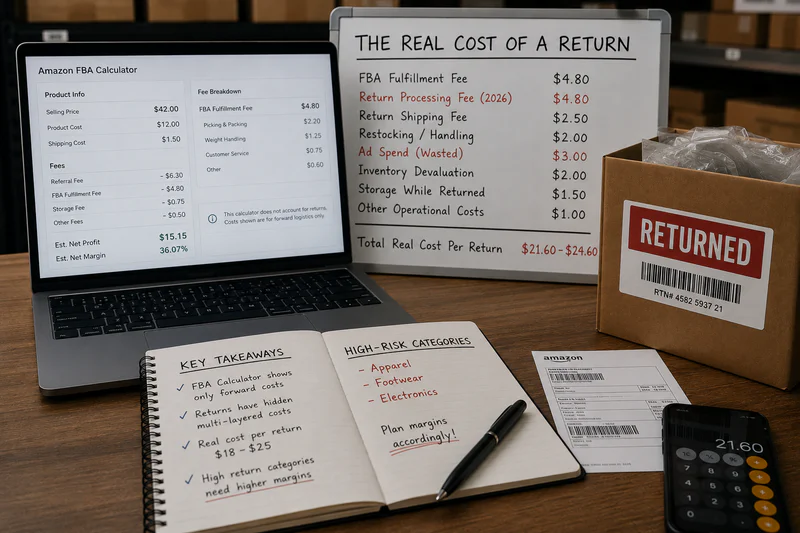
What Your Amazon FBA Calculator Misses on Every Return
Most sellers think a return costs them the refund. It does not. A return triggers a cascade of costs most FBA calculators ignore entirely.
Your Amazon FBA calculator showed $8.50 profit per unit. A single unsellable return wipes out 2.7-4 clean profitable sales. At 20% return rate across 300 monthly units - 60 returns - you are looking at $960-$2,040 in monthly return-driven losses your FBA calculator never flagged.
The 2026 Return Fee Change That Blindsided Most Sellers
Apparel and Shoes - No Threshold, Every Return Charged
Amazon charges a return processing fee equal to the full FBA fulfillment fee on every returned apparel or footwear unit. At a $6.50 FBA fulfillment fee, a 25% return rate across 400 monthly units means 100 returns - and $650 per month in return processing fees alone on top of every other cost. No exemptions, no threshold to stay under.
All Other Categories - Threshold-Based
For non-apparel categories, Amazon charges $1.78 to $11.35+ per unit only when your return rate exceeds the category-specific threshold. If your rate stays below it, this fee does not apply. If it crosses - even for one month - the fee applies to every return above the threshold in that period.
Your Amazon FBA calculator was set up at launch with estimated fees. The 2026 threshold-based return fee structure was not part of any pre-launch calculation.
The Ad Spend Layer Every Seller Ignores on Returns
Here is the return cost that never appears in any FBA calculator: the ad spend that drove the sale that became a return.
A customer clicks your Sponsored Products ad. CPC: $0.85. They buy at $42. Your TACoS on this SKU is 12% - meaning $5.04 in ad spend per sale. They return the product 8 days later.
Amazon refunds the customer. Amazon credits back your referral fee minus the admin fee. Amazon does not refund your ad spend. That $5.04 is gone permanently.
At 20% return rate and 12% TACoS across 300 monthly units, your monthly ad spend is $1,512. 60 orders return. That is $302 in ad spend lost to returns every month - not visible in your Amazon FBA calculator, not tracked in your ad dashboards. Just gone.
The Inventory Outcome Risk - When Returns Cannot Be Resold
Amazon grades returned inventory as sellable or unsellable. Here is what each outcome costs:
• Sellable : item goes back into FBA inventory. You pay repackaging cost ($1-3) but recover the unit.
• Unsellable : Amazon flags as damaged, opened, or defective. Remove at $0.97-$2.37 per standard unit, or liquidate at 5-10% of original price.
• Customer damaged : Amazon may reimburse at a depreciated rate, but the process takes weeks and rarely covers full COGS.
In electronics, defect rates on returned inventory can peak at 60-70% during Q1 liquidation cycles. At 20% unsellable rate and $12 COGS, that is $2.40 per return in inventory write-off cost : stacked on top of every other layer.
sellerview.AI tracks your return rate per ASIN alongside your full P&L automatically. You see which SKUs are generating return-driven losses without manually pulling 5 Seller Central reports every month.
How to Run Return-Adjusted Numbers Through Your Amazon FBA Calculator
Step 1: Pull Your Real Return Rate Per ASIN
Go to Seller Central > Returns > Return Report. Filter by ASIN. Return rate = units returned divided by units sold in the same period. Pull this monthly : return rates shift with seasons, listing changes, and review score changes.
Step 2: Calculate Total Return Cost Per Unit
Return Cost Per Unit = Return Rate x (Return Processing Fee + Ad Spend Per Sale + Refund Admin Fee) + (Unsellable Rate x COGS)
For a $42 apparel item at 25% return rate, 12% TACoS, 20% unsellable rate, $12 COGS:
• Return processing fee (apparel): $4.80
• Ad spend per sale: $5.04
• Refund admin fee: $1.26
• Unsellable write-off: 20% x $12 = $2.40
• Total cost per return: $13.50
• Per-unit allocation at 25% return rate: $13.50 x 0.25 = $3.38
Step 3: Subtract From Your FBA Calculator Output
Your Amazon FBA calculator shows $8.50 profit per unit. Subtract $3.38 in return cost allocation. Real post-return margin: $5.12. That is a 40% reduction from one cost category your FBA calculator never modelled.
Stop Calculating Pre-Return. Start Managing Post-Return.
Your Amazon FBA calculator is a pre-return tool. It was designed to estimate whether a product is worth launching. It was not built to manage what happens when real customers return real products at real scale.
Every seller live for more than 3 months is operating in a post-return world. Apparel at 25% return rate. Electronics at 15-20%. Even Home and Kitchen at 8-12% - three returns per week on a 50-unit seller, each one costing money your calculator never showed.
Run the return-adjusted calculation on every live SKU. If real margin collapses below 10% after returns, you have a return management problem - not a pricing problem. Fixing ad spend will not solve it. Only fixing the listing, the product, or the category will.
sellerview.ai tracks your return cost per SKU automatically - fees, ad spend allocation, and inventory outcomes included. See your real post-return margin → free to start.
FAQ: Amazon FBA Calculator and Return Costs
Does the Amazon FBA calculator include return processing fees in its calculation?
No. Amazon's FBA calculator estimates per-unit profit based on fulfillment fees, referral fees, and COGS. Return processing fees - $1.78 to $11.35+ per unit for categories above return rate thresholds, and the full FBA fulfillment fee per return for apparel and shoes - are not included. You have to add return economics manually to get a realistic margin on any SKU with meaningful return rates.
What is the 2026 Amazon return processing fee structure?
For apparel and shoes, Amazon charges a return processing fee equal to the full FBA fulfillment fee on every returned unit. No threshold applies. For all other categories, a fee of $1.78 to $11.35+ per unit applies only when your return rate exceeds category-specific benchmarks. This threshold-based model was introduced in 2024 and maintained through 2026.
Does Amazon refund ad spend when an order is returned?
No. Amazon does not refund ad spend - CPC or TACoS allocation - on returned orders. Every sale that came through a paid click and subsequently gets returned results in permanent ad spend loss. At 12% TACoS on a $42 product, each returned order costs $5.04 in non-refundable ad spend. At 20% return rate across 300 monthly units, that is approximately $300 per month in ad spend lost purely to returns.
What happens when Amazon FBA returned inventory is unsellable?
Amazon grades returned inventory as sellable or unsellable. Unsellable items — damaged, opened, or defective - can be removed at $0.97-$2.37 per standard-size unit or liquidated at 5-10% of original price. In electronics, defect rates on returned inventory can peak at 60-70% during Q1. Factor your unsellable rate into return cost calculations by multiplying the unsellable percentage by your COGS per unit.
How do I calculate the true return cost using my Amazon FBA calculator?
Take your FBA calculator profit figure and subtract: return processing fee allocation (return rate x fee per return), ad spend per sale at your TACoS rate x return rate, refund admin fee allocation (return rate x admin fee), and unsellable rate x COGS. The sum of these, subtracted from your FBA calculator output, gives your real post-return margin. For most high-return categories this reduces stated profit by 30-50%.