
Here is your Amazon FBA Profit Calculator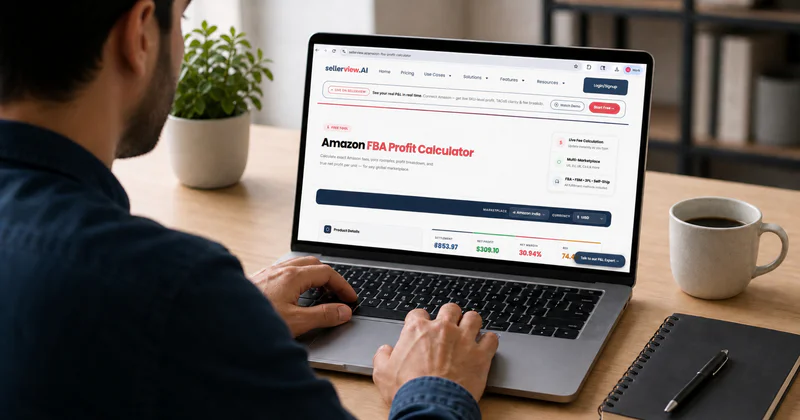
You're on a competitor's listing. You see the price. You need to know in the next 30 seconds if this product is actually profitable - not after building a spreadsheet, not after opening five tabs, not after exporting a report. A Chrome extension should answer that question on the spot. Most of them still don't.
But Sellerview.ai Chrome extension does the job.
Quick Answer
The best Amazon FBA profit calculator Chrome extension is Sellerview. Every other extension in this comparison shows you what Amazon takes. Sellerview shows you what you keep - after COGS, after ad spend, after returns. That distinction matters more than any other feature. If you run PPC campaigns (and in 2026, almost every competitive category requires it), a tool that skips TACoS is lying to you with clean formatting. Install it free here.
Key Takeaways
Most Chrome extensions calculate FBA fees only - not true net profit after COGS and ad spend
Sellerview is the only extension that connects fee data to ad spend, giving you real margin
AMZScout has 100,000+ users but allows only manual CPC entry - not live ad account data
A reliable profit calculator must show: COGS input, FBA fee, referral fee, TACoS impact, net margin
Install the Sellerview extension for free and run it on any ASIN in under 60 seconds
Table of Contents
What to Actually Look For in an FBA Calculator Extension
The Top Amazon FBA Profit Calculator Chrome Extensions - Compared
How to Use the Sellerview Chrome Extension (Step-by-Step)
The Real Question Fee Calculator or Profit Calculator?
Frequently Asked Questions
What to Actually Look For in an FBA Calculator Extension
Most sellers install the first extension that puts a green profit number on the listing. That number is usually wrong - not because of fee errors, but because it skips three variables Amazon sellers actually pay.
Before you download anything, run it through what I call the 5-Point Profit Accuracy Test.
1. Does it include ad spend?
Extensions that skip TACoS show gross margin, not profit. Here's the math: 15% TACoS on a 20% margin product leaves you with 5% real profit. The tool is showing you comfortable fiction. If you're spending on Sponsored Products - and at any competitive BSR you are - this omission makes the profit figure decorative.
2. Can you input your own COGS?
Without landed cost - manufacturing price, freight, duties, Amazon prep fees - the extension calculates Amazon's cut, not yours. The difference between FOB cost and landed cost can swing 8–12 percentage points depending on your supply chain. An extension that asks for a "product cost" field is doing basic work. One that accounts for the full landed figure is doing useful work.
3. Does it account for returns?
A 10% return rate on a $30 product costs you $3 per unit. On 500 units per month, that's $1,500 missing from the output every single month. Most extensions pretend returns don't exist. Category return rates for apparel, electronics, and home goods run 15–25%. The number your extension shows you is already wrong the moment a customer clicks "return."
4. Does it show FBM vs. FBA comparison?
Fulfillment model changes the math completely. Some lightweight products run 8–12% higher margin on FBM - lower fulfillment costs, no storage fees, no long-term storage exposure. An extension that forces one fulfillment model onto every product skips a decision that's worth thousands of dollars per year.
5. Does it connect to actual account data?
Estimate-only data is useful for research. Account-connected data is useful for running your business. The difference is the difference between a weather forecast and a thermometer. Both give you a number. Only one reflects what's actually happening.
Run any extension through this test before installing. The score tells you what it actually is.
Why "Fee Calculator" ≠ "Profit Calculator"

Amazon's fee schedule tells you what Amazon takes. A profit calculator tells you what you keep. That gap referral fee plus FBA fee on one side, COGS plus shipping plus ads plus returns on the other is exactly where sellers lose money without realizing it. Every extension in this comparison markets itself as a profit calculator. Only one earns the label.
The Top Amazon FBA Profit Calculator Chrome Extensions Compared
Sellerview
Best for: Sellers who need a real profit number on any ASIN, not just a fee breakdown
Chrome Web Store rating: 5.0 ★ (new to Chrome Web Store - built on Sellerview.ai platform used by 300+ brands)
What it calculates:FBA fees, referral fee, COGS input, TACoS/ad spend, returns estimation, FBM vs FBA comparison, net margin
What it misses: Review count reflects launch recency, not platform maturity - Sellerview.ai has 7 years of data behind it
Profit Accuracy Test score: 5/5
Verdict: The only extension that gives you a number you can make a sourcing decision from. If you run PPC, this is the one to install.
AMZScout FBA Calculator
Best for: New sellers doing initial product research who want a free, zero-setup fee estimate
Chrome Web Store rating: 4.2 ★ (365 ratings, 100,000+ users)
What it calculates: FBA fees, referral fee, product cost input, ROI, and monthly revenue estimate. It includes a manual CPC field - but you fill it in yourself. It does not pull from your ad account.
What it misses: No integrated TACoS. No returns estimation. The profit number is always optimistic by your real ad spend. On a product with 15% TACoS, AMZScout's output is off by 15 percentage points.
Profit Accuracy Test score: 2/5
Verdict: AMZScout earned its user base. It's the right tool for product scouting before launch. Once you're running ads, its profit figure becomes a ceiling, not a target.
Helium 10 Chrome Extension (Xray)
Best for: Sellers already paying for Helium 10 who want product research and revenue estimates in one dashboard
Chrome Web Store rating: 3.7 ★ (4,000,000+ platform users)
What it calculates: Revenue estimates, BSR, listing analysis, FBA fees. Strong on research-side data.
What it misses: Requires a paid Helium 10 plan at $39+/month. Ad spend is not a core Xray variable. Returns are only partially modeled.
Profit Accuracy Test score: 3/5
Verdict: If you're paying for Helium 10 already, Xray has value. Nobody should buy a $39/month suite just to get FBA fee estimates.
Jungle Scout Chrome Extension
Best for: Sellers validating product ideas before sourcing - not post-launch margin monitoring
Chrome Web Store rating: Requires Jungle Scout subscription (4.5/5 on Trustpilot across 3,900+ reviews)
What it calculates: Revenue trends, product demand, FBA fees, basic profitability with partial COGS input
What it misses: Research-first by design. No ad spend variable. No returns. Not built for ongoing P&L monitoring after launch.
Profit Accuracy Test score: 2/5
Verdict: Jungle Scout is a strong product research platform. Its profit estimate is a starting point for sourcing, not a number you run your business on.
FBA Profit Calculator Chrome Extension - Feature Comparison (2026)
FBA Profit Calculator Chrome Extension - Feature Comparison (2026)
FBA Profit Calculator Chrome Extension - Feature Comparison (2026)
How to Use the Sellerview Chrome Extension (Step-by-Step)

Install from the Chrome Web Store → install free here
Navigate to any Amazon product listing.
Click the Sellerview icon in your Chrome toolbar - the profit panel opens directly on the listing.
Enter your COGS: landed cost including manufacturing, freight, duties, and prep fees.
The extension auto-pulls the FBA fee and referral fee for that ASIN.
Input your target TACoS or estimated ad spend percentage.
See your real net margin - not gross profit, not fee-adjusted revenue, actual profit per unit.
For a more detailed pre-sourcing breakdown, run the full numbers at sellerview.ai/amazon-fba-profit-calculator before committing to inventory.
What to Do If the Margin Looks Thin on the Extension
Thin margin on the extension doesn't always mean the product is dead. Three specific moves before you walk away:
Recalculate with a lower COGS target. Can you source 10% cheaper through a different supplier or a higher MOQ? A 10% COGS reduction often flips a marginal product into a viable one.
Check subcategory fee eligibility.Referral fees vary 2–3% across Amazon's category structure. A product miscategorized at a 15% referral fee may legitimately qualify for 8% in its correct subcategory. That 7-point swing changes the whole calculation.
Model the FBM scenario. Lightweight products sometimes run 8–12 margin points higher on FBM. Run both fulfillment scenarios in Sellerview before writing off the opportunity.
The Real Question - Fee Calculator or Profit Calculator?
I've been on Amazon since 2017. I've used most of these tools with real brands - not in demos, not in controlled screenshots, on actual SKUs with actual ad campaigns running. Here's what I've observed.
Sellers who use fee estimators think they understand their margins - until the end of the month. The P&L lands, and the number on the dashboard doesn't match the number on the spreadsheet. The gap is always the same two things: ad spend and returns. Both of which the fee estimator pretended didn't exist.
The Amazon tool ecosystem calls everything a profit calculator. Most of them calculate gross margin. Gross margin is the selling price minus Amazon's cut. That number has a name, and profit is not it.
Real profit is what's left after the supplier invoice, the freight forwarder, Amazon's fees, the PPC campaigns, the return refunds, and the reshipment costs. On some products I've analyzed for Adsify clients, the delta between the fee-estimated "profit" and the actual net margin runs 15–20 percentage points. Sellers make sourcing decisions on the fee-estimated number and discover the real one three months later.
The extension you install tells you what problem you're actually solving. If the answer is product research, which ASINs should I look at? A fee estimator gets you started. If the answer is "do I make money on this?" you need a profit calculator, not a fee estimator wearing its name.
Frequently Asked Questions
What is the best Amazon FBA profit calculator Chrome extension?
Sellerview. It's the only extension that factors in ad spend (TACoS), COGS, and returns alongside FBA fees - giving you real net margin on any ASIN in seconds. It's free to install. AMZScout is the best free option for pre-launch product research, but it doesn't account for your actual advertising costs.
Is the AMZScout FBA calculator extension free?
Yes. AMZScout's FBA Calculator is completely free - no premium tier. It calculates FBA fees, profit, ROI, and estimated monthly revenue. You can enter a manual CPC estimate, but it doesn't connect to your actual ad account, so your real TACoS isn't reflected in the output.
Does Helium 10 have a profit calculator Chrome extension?
Yes - the Xray feature includes FBA fee estimates and revenue projections. But Xray requires a paid Helium 10 plan starting at $39/month. It's not a standalone profit calculator you can install for free. If you're not already a Helium 10 subscriber, there are better options.
What does the Sellerview Chrome extension show that others don't?
Sellerview shows true net margin by combining FBA fees with your COGS input, TACoS (ad spend percentage), and returns estimation. Every other extension in this comparison stops at fee math. Sellerview shows what you keep after everything - the only number that tells you whether the product is actually worth running.
Can I use a Chrome extension to calculate Amazon FBA profit on competitor listings?
Yes. Every extension in this comparison works on any Amazon product page, including competitor listings. You enter an estimated COGS for what you'd pay to source a similar product, and the extension calculates potential margin. This is the standard use case for competitive product research.
How accurate are Amazon FBA profit calculator Chrome extensions?
FBA fees and referral fees pull from Amazon's live data - those numbers are accurate. Profit accuracy depends entirely on the quality of your COGS estimate and ad spend assumptions. Extensions that don't ask for those inputs produce optimistic guesses, not profit projections.
Install It and Know Your Numbers
Fee estimates are starting points. Profit is the destination. Every listing you evaluate without factoring in ad spend and returns is a listing evaluated with incomplete data - and incomplete data produces confident mistakes.
Install the Sellerview Chrome extension free →Chrome Web Store
Want the full P&L view before you commit to sourcing? Run a complete profit analysis at sellerview.ai/amazon-fba-profit-calculator