
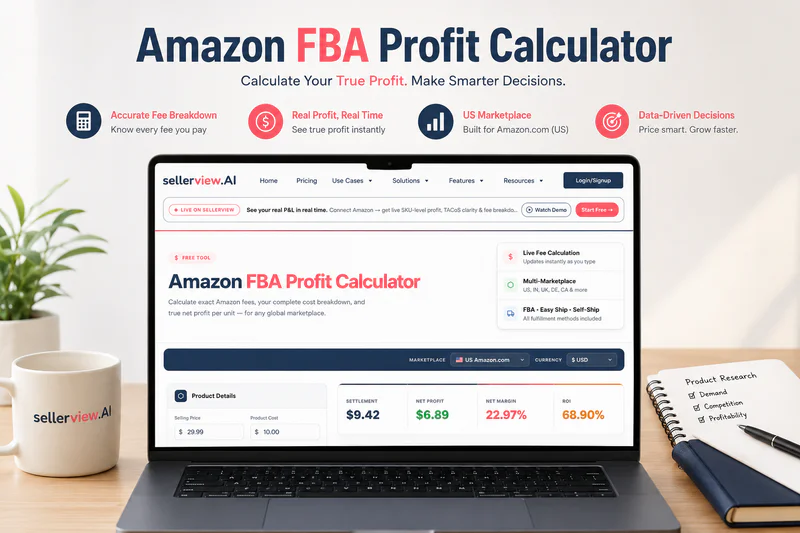
A seller doing $40K in revenue per month. Products ranking. Ads running. Orders are coming in every day. They open Seller Central, see the number, and feel good. Six months later, their CPA asks why there's $4K in the bank after $600K in sales. That's when they realise: they were watching revenue, not profit. The math was wrong from day one.
Key Takeaways
The correct Amazon profit formula has 6 variables - sellers tracking only revenue minus COGS typically overstate their margins by 15–25%
Amazon's own Revenue Calculator excludes COGS, ad spend, returns, and long-term storage - it shows fees, not profit
A healthy net margin on Amazon is 20–25% after all deductions; below 15% and one fee hike puts you in the red
TACoS (not ACoS) is the only ad metric that connects your advertising to real profitability - a 20% ACoS can coexist with a business that's bleeding cash
Run your SKU-level numbers in real-time using the Sellerview profit calculator
Table of Contents
The Real Amazon Profit Formula (Most Sellers Get This Wrong)
What Amazon's Own Calculator Misses
How to Use an Amazon Profit Calculator (Step-by-Step)
Profit Margin Benchmarks - What's Good, What's a Warning Sign
TACoS - The One Metric That Connects Ads and Profit
Common Mistakes Sellers Make When Calculating Amazon Profit
Frequently Asked Questions
The Real Amazon Profit Formula (Most Sellers Get This Wrong)
Most sellers subtract product cost from selling price, look at the number, and call it margin. That number is not your margin. It is the most optimistic version of a number that will never show up in your bank account.
Here is the actual formula - what I call The Sellerview Profit Stack:
Six variables. Most sellers know three of them. The other three are where profit disappears.
Layer 1: Amazon Referral Fee
Amazon takes a commission on every sale - typically 8-15% depending on category. Beauty runs 10%. Electronics can be 8%. Jewellery hits 20%. Check your category's exact rate on Amazon's official referral fee schedule. This comes off before anything else.
Layer 2: FBA Fulfilment Fee
Amazon charges $3.06-$6.10 per unit (standard size) in the US to pick, pack, and ship. Amazon raised FBA fees by an average of $0.08/unit in January 2026. Current FBA fee tables are on Amazon's pricing page. This changes yearly — model it fresh each time.
Layer 3: Cost of Goods (COGS)
Not just your factory price. COGS = manufacturing + packaging + quality inspection + freight to FBA warehouse + import duties. Sellers routinely undercount COGS by 15-20% by stopping at the factory price.
Layer 4: Ad Spend (PPC)
If you're profitable before including ad spend, you are not profitable. Ad spend is an operating cost, not a marketing bonus. Include it as a % of total revenue (your TACoS - more on this below).
Layer 5: Returns & Refunds
Every returned unit costs you twice: you lose the sale revenue, and Amazon charges you a return processing fee on top. For high-return categories like apparel, this alone wipes 3-5% of margin. Model it as a % of revenue using your historical return rate.
Layer 6: Storage Fees
Monthly storage in the US runs approximately $0.87-$2.40 per cubic foot, depending on season. If units sit unsold past 365 days, long-term storage fees stack on top. Seasonal products can sit for 9 months doing nothing but accruing storage costs.
What it looks like in practice:
This is a $19.99 face wash in health & beauty. Gross margin before fees and ads looks like 56%. After all six layers, it's 11.5%. One return rate spike, one fee change, one slow warehouse month - this SKU is underwater.
What Amazon's Own Calculator Misses
Amazon's Revenue Calculator does one thing well: it estimates FBA fees before you launch. That is its purpose. It is not a profit calculator.
What it deliberately leaves out:
It ignores your COGS. There is a "product cost" field, but most sellers enter only the factory price, not the total landed cost. The tool doesn't correct that.
It ignores ad spend entirely. No PPC field. You can run a product at 35% TACoS, and Amazon's FBA fee calculator will show you a "profitable" result.
It ignores return processing fees. When a customer returns a product, Amazon charges a refund administration fee. Not in the calculator.
It ignores storage in any meaningful way. You can enter monthly storage manually, but most sellers don't know their per-unit figure without pulling a separate report. And it ignores long-term storage entirely.
If you only use Amazon's calculator, you're calculating fees. Not profit.
The Hidden Fees Amazon's Calculator Ignores
Long-term storage fees - charged after 365 days; $6.90+ per cubic foot in the US
Return processing fees - charged per unit returned, even if the item is unsellable
Inbound placement fees - charged when Amazon splits your FBA shipment across warehouses without managed placement
Disposal fees - charged when you need Amazon to remove or destroy unsold inventory
FBA seasonal capacity fees - imposed during peak periods when Amazon restricts capacity
None of these appears in the Revenue Calculator.
How to Use an Amazon Profit Calculator (Step-by-Step)
Here is how to run a real profit calculation using the Sellerview Amazon profit calculator:
Enter your selling price - use your current live price, not MSRP or a promotional price
Enter your COGS - include manufacturing, packaging, quality checks, and all freight to the FBA warehouse. Factory price alone is not COGS.
Input your FBA fees - the calculator auto-estimates based on category and dimensions, or enter manually from your Seller Central fee report
Enter your average ad spend % - use TACoS if you know it (total ad spend ÷ total revenue). If you only have ACoS, use it as a rough proxy, but know it's optimistic.
Add your average return rate - pull this from Seller Central's Return Reports. Above 5% is a margin risk worth flagging separately.
Read your real net margin - not gross, not "before fees," not estimated. Actual net.
You can also install the Sellerview Chrome Extension to run this amazon seller profit calculation directly on any product listing without leaving the page - useful for competitive research and new product evaluation before you commit to inventory.
Profit Margin Benchmarks - What's Good, What's a Warning Sign
The Sellerview Margin Health Check
These benchmarks come from analysing P&L data across 300+ Amazon brands managed through Adsify and Sellerview.
Three rules that matter:
The 1/3 rule: Your selling price should be at least 3× your total landed COGS. If you source at $3.75 all-in, your floor price is $18.99. Below that, fees and ads leave nothing.
ASP minimum: Any product below $10 in the US is structurally difficult to make profitable. The flat fulfilment fee hands over a disproportionate chunk of revenue before you've subtracted anything else.
Category variance matters: Home & Kitchen can sustain 22–28% net. Electronics often caps at 8–12% due to category competition and higher return rates. Benchmark within your category, not across the entire marketplace.
TACoS - The One Metric That Connects Ads and Profit

Every article about Amazon FBA profit calculators skips this. That is the gap that costs sellers the most money.
TACoS = Total Ad Spend ÷ Total Revenue
Not ad-attributed revenue. Total revenue - organic and ads combined.
Here's why ACoS misleads you: say you spend $2,500 in ads on $6,250 in ad-attributed revenue. Your ACoS is 40% - aggressive, but you might be working to optimise it. But your total revenue that month is $12,500. Your TACoS is 20%. That is the number that tells you whether ads are helping or destroying your business.
The flip is also true. A 20% ACoS sounds fine. But if organic sales are low and ads are driving most of your volume, TACoS might be 35%+. At that level, you're not profitable, no matter what your gross margin says.
Healthy TACoS benchmarks:
Under 10% - strong organic base, ads are a multiplier
10–15% - normal for a scaling brand
15–20% - acceptable for a new launch, fix it quickly
Above 20% - ads are propping up sales, but organic can't sustain
This is why Sellerview has TACoS tracking built into the P&L view from day one - not as a side metric, but as a core input to profitability.
How to Calculate Your Break-Even TACoS
Your break-even TACoS is the maximum percentage of revenue you can spend on ads before profit hits zero.
Formula: Break-even TACoS = (Revenue – COGS – Amazon Fees – Returns – Storage) ÷ Revenue × 100
Using the face wash example:
Revenue: $19.99
COGS: $8.75, Amazon fees: $6.50, Returns + storage: $1.60
Pre-ad margin: $3.14 ÷ $19.99 = 15.7%
Break-even TACoS = 15.7%. Actual TACoS = 18%. Net margin = 15.7% – 18% = 11.5%.
If TACoS climbs to 30% on this product, you are selling at zero profit. Know this number before you scale ad spend.
Common Mistakes Sellers Make When Calculating Amazon Profit

1. Using the selling price as revenue
Amazon pays you net of their fees. Entering $19.99 as your revenue and subtracting costs from there means your starting number is wrong by $6.50+.
2. Forgetting return processing fees
A return costs you the sale. It also costs you Amazon's refund administration fee on top. That double hit is invisible until you see it in a payout reconciliation.
3. Using ACoS instead of TACoS
ACoS measures campaign efficiency. TACoS measures business profitability. Optimising for ACoS while ignoring TACoS is how you run great campaigns on a business that's losing money.
4. Not provisioning for storage
Seasonal products sell well in Q4 and sit in Amazon's warehouse for 9 months a year. Those fees compound per unit. If you're not modelling storage per SKU, your margin is a fiction.
5. Ignoring COGS on bundles
A 2-pack changes the FBA fee calculation and the referral fee basis. Bundle margin ≠ single-unit margin × 2. Sellers assume it does, then wonder why the P&L doesn't match the projection.
6. Running profitability once and never again
Amazon updated FBA fees in January 2026 - and has changed fee structures multiple times in the last three years. A calculation that was accurate six months ago may not be accurate today.
Frequently Asked Questions
How do you calculate profit on Amazon?
Net profit = Selling price – Amazon referral fee - FBA fulfilment fee - COGS – ad spend – returns provision – storage fees. Most sellers stop after COGS and fees. Including ad spend and returns is what gives you the real number.
What is a good profit margin when selling on Amazon?
20–25% net margin after all deductions (including ads) is healthy. Below 15% you're exposed to any fee increase or return spike. Below 10% the business is not viable. Home & Kitchen can hit 22–28%; electronics typically caps at 8–12%.
Can you make $1,000 a month selling on Amazon?
Yes - but not on low-volume, low-ASP products. To net $1,000/month at a 20% margin, you need $5,000 in revenue. That requires consistent volume, controlled TACoS, and a product priced above the threshold where FBA fee structures make sense.
How many Amazon sellers make over $100K?
Amazon reports 60,000+ sellers generating over $1M in annual sales. Revenue is not profit. The subset achieving $100K+ in net profit is significantly smaller. Margin discipline is what separates the two groups.
Does Amazon's own calculator show true profit?
No. Amazon's Revenue Calculator shows FBA fees and referral fees only. It does not include COGS, ad spend, returns, long-term storage fees, or return processing fees. It is a fee estimator - not an Amazon profit margin calculator.
What is the difference between ACoS and TACoS for Amazon sellers?
ACoS = Ad spend ÷ Ad-attributed revenue. TACoS = Ad spend ÷ Total revenue (organic + ads). TACoS is the metric that matters for profitability. ACoS only tells you campaign efficiency - not whether your ads are helping the overall business.
Stop Estimating. Start Knowing.
The profit number in your head is not your profit. Revenue minus COGS is not your margin. And Amazon's calculator is not a substitute for real P&L tracking.
Run every SKU through a real Amazon FBA profit calculator that includes all six variables - before you scale, before you reorder, and every time Amazon changes its fee structure.
Try the Sellerview Amazon Profit Calculator free →
Want to check profitability on any listing in one click? Install the Sellerview Chrome Extension →