
Your Amazon Profit Calculator Shows 24% Margin. Your Real COGS Is Killing It
You run your Amazon profit calculator. Selling price $38. COGS $10. Referral fee 15%. FBA fee $4.50. Ad spend. Storage. The calculator spits out 22% margin. Looks fine.
Except your COGS is wrong.
Most Amazon sellers enter their factory price as COGS. That is the price the supplier invoiced. But landed cost - the number that actually belongs in your Amazon profit calculator - includes freight from the factory to the FBA warehouse, customs duties, import taxes, insurance, prep fees, and any inspection costs. Leave those out and your margin estimate is optimistic by 5-15 percentage points on every SKU.
In 2026, this error is more expensive than ever. Tariffs on Chinese goods have driven import duties up across categories. If tariffs add $1.50 per unit to a product with $3.22 in FBA fees, your logistics costs alone jumped to $4.72 - before a single rupee of ad spend. Your Amazon profit calculator is showing you a number that does not exist.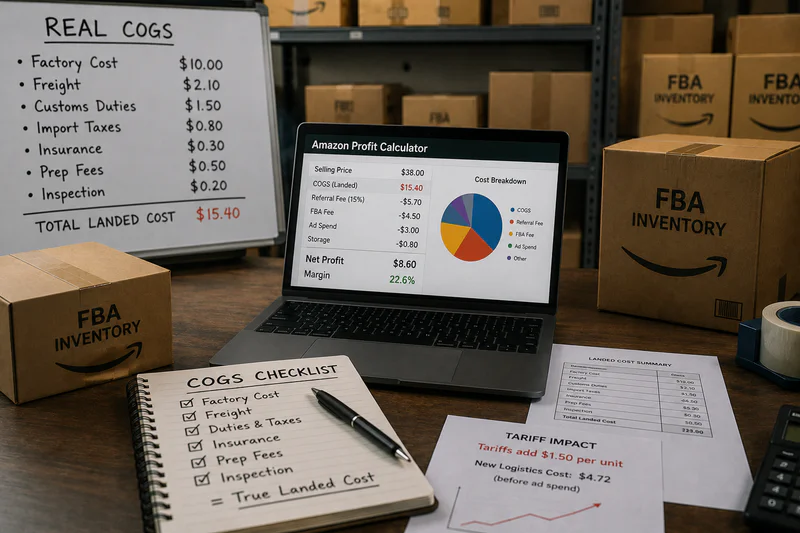
Why Amazon Profit Calculators Show the Wrong COGS by Default
Every Amazon profit calculator - including the free Revenue Calculator in Seller Central - requires you to input your cost per unit. The calculator does not know what your COGS includes. It takes whatever number you type and uses that.
Most sellers type their supplier unit price. That is the factory FOB price - the cost of the product at the factory gate. It excludes everything that happens after the goods leave the factory:
• Ocean or air freight from origin to destination port
• Customs duties and import tariffs (including Section 301 surcharges for Chinese imports)
• Port handling, customs broker fees, and clearance costs
• Inland freight from the port to the FBA prep center or warehouse
• Prep and labeling costs (now mandatory after Amazon ended FBA prep services in January 2026)
• Marine cargo insurance
Each of these is a real cost that exists between your factory and your FBA shelf. None of them are in your Amazon profit calculator unless you put them there. And if you are not putting them there, your per-unit profit estimate is wrong - and every decision you make on pricing, scaling, and inventory capital is based on that wrong number.
The Correct COGS Formula for Your Amazon Profit Calculator
Here is the formula. Simple, specific, and the only one that belongs in your profit calculator:
Landed Cost Per Unit = Factory Unit Cost + Inbound Freight Cost Per Unit + Customs Duties Per Unit + Port and Broker Fees Per Unit + Inland Freight Per Unit + Prep and Labeling Per Unit + Insurance Per Unit
That is your real COGS. Plug this into your Amazon profit calculator and your margin estimate reflects reality.
How to Allocate Each Cost to a Per-Unit Number
The tricky part is converting shipment-level costs into per-unit costs. Here is how to do it:
Inbound freight: Take the total ocean or air freight cost for the shipment. Divide by total units in the shipment. If you paid $2,400 in ocean freight for 1,200 units, that is $2 per unit. Simple.
Customs duties: Duties are calculated as a percentage of the declared FOB value of the goods. If your HTS duty rate is 12% and your FOB value per unit is $10, duties are $1.20 per unit. For Chinese imports with Section 301 tariffs, rates can be 25-145% on top of the base rate. Add both. Your customs broker provides a duty breakdown per shipment - divide by units to get per-unit duty.
Port and broker fees: Customs broker fee ($200-$500 per shipment), port handling, ISF filing ($35-$80), and any exam fees if your container gets inspected. Total these, divide by units. On a 1,200-unit shipment with $600 in total port/broker fees, that is $0.50 per unit.
Inland freight: The cost of moving goods from the port to your prep center or directly to FBA. Divide total trucking cost by units. $300 on 1,200 units = $0.25 per unit.
Prep and labeling: Since Amazon ended FBA prep services in January 2026, you need an external prep center or do it yourself. Budget $0.15-$0.50 per unit for poly-bagging and FNSKU labeling depending on the prep center and product type.
Insurance: Marine cargo insurance typically runs 0.3-0.5% of the declared shipment value. On a $12,000 shipment, that is $36-$60 - or $0.03-$0.05 per unit. Small, but should be included.
Add them all up. That is your landed cost. That is your COGS for the Amazon profit calculator.
A Worked Example: What COGS Actually Looks Like Per Unit
A seller using $10 as their COGS in the Amazon profit calculator sees a very different margin than a seller using $16.79. On a $38 selling price, the difference in net profit per unit is $6.79. If you are selling 500 units per month, that is $3,395 per month in margin you think you have but do not. Annualised: $40,740 in phantom profit on a single SKU.
COGS Changes Every Shipment - And Your Profit Calculator Does Not Know
Here is what makes this harder than a one-time calculation. Your landed cost per unit is not fixed. It changes with every shipment.
Ocean freight rates fluctuate. They dropped significantly in 2023-2024 and have been trending up in 2025-2026 with capacity constraints on major Asia-US routes. A product that cost $1.80/unit to ship by ocean last year might cost $2.60/unit this year.
Duty rates change with trade policy. Section 301 tariffs on Chinese goods have been adjusted multiple times since 2018. Sellers who have not recalculated duties after each tariff update are working with stale COGS numbers.
Exchange rate movements change your FOB cost in dollar terms if you buy in a foreign currency.
This means your Amazon profit calculator COGS needs to be updated after every shipment - not set once at launch and left unchanged. The sellers who do this monthly know their real margin. The sellers who do not are running on a number that gets more wrong every quarter.
sellerview.ai lets you update COGS per batch, per shipment, so your margin view reflects the actual cost of the inventory currently in Amazon warehouses - not an estimate from 9 months ago.
3 Practical Steps to Fix Your Amazon Profit Calculator COGS Right Now
Step 1: Pull Your Last 3 Shipment Commercial Invoices and Freight Bills
Go to your customs broker or freight forwarder portal. Pull the customs entry summary for your last 3 shipments. This shows declared FOB value, duty rate, and total duty paid. Pull the freight invoice separately. Divide each cost element by the unit count in that shipment. You now have a per-unit landed cost for recent orders. Average these across the 3 shipments to get a baseline.
Step 2: Build a Landed Cost Spreadsheet Per SKU
Create one row per SKU. Columns: factory unit cost, freight per unit (last shipment), duty rate (%), duty per unit, broker fees per unit, inland freight per unit, prep cost per unit, insurance per unit, total landed cost. Update after each shipment. This takes 20 minutes once the template is built. Your Amazon profit calculator gets the right COGS input every time.
Step 3: Recalculate Your Margin on Every SKU With the Corrected COGS
Once you have real landed cost, re-run your Amazon profit calculator on every active SKU. Any SKU where your old margin estimate was above 20% and your new estimate is below 15% is a product that needs immediate attention - pricing review, COGS renegotiation, or a sourcing alternative. Do not wait. Every month you run on wrong COGS is a month your inventory capital decisions are based on fiction.
The Amazon Profit Calculator Is Only Right When COGS Is Right
Your Amazon profit calculator is a machine. It calculates correctly. The problem is the input. Factory price is not COGS. It is the starting point for COGS.
Landed cost - factory price plus every dollar you spend getting that product from the factory gate to the FBA shelf - is the number that belongs in your profit calculator. And in 2026, with mandatory prep costs, volatile freight rates, and tariffs that vary by product category and country of origin, the gap between factory price and landed cost is wider than it has ever been.
Fix your COGS. Re-run your calculator. Then make inventory, pricing, and scaling decisions based on what is actually true.
FAQ: Amazon Profit Caculator and COGS Calculation
What costs should I include in COGS for my Amazon profit calculator?
Your COGS for the Amazon profit calculator should equal your fully landed cost per unit: factory unit price (FOB) + inbound ocean or air freight per unit + customs duties and import tariffs per unit + customs broker and port fees per unit + inland freight to prep center or FBA per unit + prep and labeling costs per unit + marine insurance per unit. Do not include Amazon FBA fulfillment fees, referral fees, or ad spend in COGS - those are operating expenses that belong as separate line items in your profit calculator.
How do I calculate shipping cost per unit for Amazon FBA COGS?
Take the total freight invoice for the shipment (ocean, air, or LCL rate) and divide by the number of units in that shipment. If you shipped 1,200 units at $2,400 in ocean freight, your freight cost per unit is $2.00. Do this separately for inbound freight (factory to port or destination) and inland freight (port to prep center or FBA warehouse). Both should be included in your landed COGS.
How do customs duties affect my Amazon profit calculator margin?
Customs duties are calculated as a percentage of the declared FOB value of your goods based on the HTS code. For Chinese imports subject to Section 301 tariffs, the combined rate can be 25-145% on top of the base duty rate. If tariffs add $1.50 per unit to a product with a $3.22 FBA fulfillment fee, your total logistics cost is $4.72 before storage or ad spend. This directly reduces the margin your Amazon profit calculator shows - any seller not including duties in COGS is significantly overstating margin.
Do I need to update my COGS in the Amazon profit calculator for every shipment?
Yes - after every shipment, ideally. Freight rates, duty rates, and prep costs all change. A product sourced from China in Q1 at $2.00/unit freight may cost $2.80/unit by Q3 if ocean rates increase. Section 301 tariff rates have been adjusted multiple times since 2018. Using a COGS figure from a shipment 6-9 months ago means your current margin estimate is wrong. Update your landed cost after each order is customs-cleared and your freight invoice is final.
Are Amazon FBA fulfillment fees part of COGS or a separate cost?
FBA fulfillment fees - the per-unit charges Amazon charges for picking, packing, and shipping your orders - are an operating expense, not COGS. They should appear as a separate line item in your Amazon profit calculator, not bundled into your cost of goods. COGS covers the costs of acquiring and landing inventory. FBA fees are a cost of selling, not a cost of the goods themselves. Mixing them inflates your COGS and understates your gross margin, which affects how you evaluate SKU profitability.