
The Product Looked Profitable in the Amazon Profit Calculator. It Was Not
You ran the amazon profit calculator. Selling price $36. COGS $11. Referral fee $5.40. FBA fee $4.22. Net profit: $15.38. Margin: 42.7%. You launched.
Ninety days later, real margin: 9.2%.
The calculator did not lie. But you gave it the wrong question. You asked what the margin would be on a clean sale with no ads, no returns, and no 2026 fee stack. You should have asked: what is the minimum margin this product needs to show before I commit capital? Those are different questions with very different answers.
After working with 300+ Amazon brands across categories like Home & Kitchen, Beauty, and Electronics, the pattern is always the same: sellers launch without a pre-defined margin floor, discover the real number 90 days later, and spend the next six months trying to fix a problem they should have filtered out in the amazon profit calculator before they placed the order.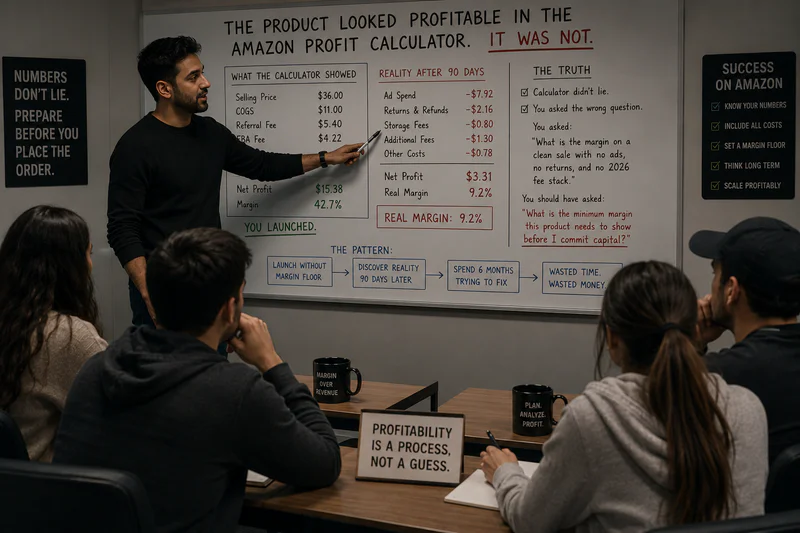
What Is Minimum Viable Margin for Amazon FBA?
Minimum viable margin (MVM) is the lowest acceptable net profit percentage an Amazon product must show in your amazon profit calculator - after all cost deductions including COGS, Amazon fees, ad spend, returns, and storage - before you commit capital to launch. It is not a goal. It is a gate. Any product that cannot clear your MVM threshold in a conservative base-case model does not get funded.
Why Most Sellers Do Not Have a Margin Floor - And What It Costs Them
Most Amazon sellers have an informal sense of what they want margin to be. They want it to be "good." They want it to be "healthy." Vague benchmarks produce vague decisions.
Here is what actually happens without a defined MVM:
• A product shows 18% gross margin in the amazon profit calculator. The seller thinks that sounds reasonable. They launch.
• Ad spend runs at 14% TACoS in the first 90 days. That alone cuts net margin to 4%.
• Return rate is 11% - category average for Home & Kitchen. Add $0.90 per unit in return cost allocation. Now at 1.5% net.
• One fee update. One return rate spike. One competitive price drop. Negative.
The problem was not the fee update or the return rate. The problem was a product that launched at 18% gross with no room for any of the variables that always move. The MVM would have flagged this before the purchase order went out.
A margin floor is not pessimism. It is the thing that stops you from funding products that cannot survive real-world operating conditions.
How to Calculate Your Minimum Viable Margin Using Your Amazon Profit Calculator
What is the baseline net margin formula for an Amazon profit calculator?
Net Margin = (Selling Price − COGS − Referral Fee − FBA Fee − Placement Fee − Ad Spend − Return Allocation − Storage) / Selling Price x 100
Most amazon profit calculator tools auto-calculate referral fee, FBA fee, and gross margin. The three that are almost always missing: placement fee ($0.40/unit standard minimal split from Jan 2026), ad spend at a real TACoS estimate, and return rate allocation. Add all three before you evaluate whether a product clears your MVM.
What should I enter as ad spend in my Amazon profit calculator before launch?
Use your category benchmark TACoS for the first 90 days of launch - not zero, and not your mature TACoS. At launch, you are buying velocity, reviews, and rank. You are not running at efficiency yet. Use these benchmarks:
Enter launch TACoS x selling price as your per-unit ad spend input in the amazon profit calculator. Do not enter zero. A product at $36 with 15% launch TACoS means $5.40/unit in ad spend. That is the real cost of acquiring a customer on a new launch.
Your free Amazon Profit Calculator
What return rate should I use in my Amazon profit calculator before sourcing?
Use your category benchmark. If you have existing data from a similar product, use that. If this is a new category for you, use these ranges:
Return cost per unit = return rate x cost per return. Add this to your amazon profit calculator cost stack. For electronics at 15% return rate with $12/return cost, that is $1.80/unit - invisible in most calculators, real in your Payments report.
What is the minimum viable margin I should set as a floor?
In 2026, your MVM floor should be category-specific. Here is the framework:
The 20% floor is not a round number - it is structural. At 20% net, a 3-percentage-point fee increase (common in 2026), a return rate spike, or a price compression from competition still leaves you at 14-17% net. Survivable. At 15% net with the same events, you are at 9-12% or below. Not survivable on a new product without an established brand moat.
Are there categories where the MVM floor is different?
Yes. Two exceptions:
Electronics and tech accessories: The practical MVM for electronics is 25% gross because net margin after real return rates (15-20%) and high TACoS (15-22%) is so compressed. Running the amazon profit calculator at 20% gross for electronics almost always produces sub-10% net. Start with 25% gross as your minimum, not 20%.
Apparel and fashion: The practical MVM is 30% gross. Return rates of 20-28% combined with launch TACoS of 15-22% compress net margin severely in the first 90 days. A 20% gross margin apparel product will produce negative net margin at launch. There is no room. Start at 30% gross or do not launch.
MVM Is Not the Same as Target Margin
Your MVM is the minimum you will accept. Your target margin is what you are actually building toward.
A product at 21% net margin has cleared the MVM gate - but that does not make it a great business. It makes it the minimum acceptable business. The sellers who build sustainable Amazon businesses are not celebrating 20% margin at launch. They are targeting 25-30% net at maturity and using MVM as the filter that keeps them out of products that cannot reach that target even when everything goes right.
Think of MVM as the first gate - necessary but not sufficient. A product that clears 20% base case is worth sampling and further evaluation. A product that clears 25%+ base case is worth sourcing at MOQ and validating in-market. The two thresholds do different jobs. Both matter.
How to Set Your MVM Before Running Any Amazon Profit Calculator
Before you open the amazon profit calculator for a new product, define your MVM inputs first. Here is the checklist:
• Define your MVM floor: 20% net for standard categories, 25% for electronics, 30% for apparel. Non-negotiable.
• Calculate your fully landed COGS - not just the supplier quote. Add freight, duties, broker fees, prep, and insurance.
• Use launch TACoS for your category, not zero. Pull from the table above.
• Add return rate allocation using your category benchmark.
• Add 2026 FBA fees - including inbound placement ($0.40/unit standard) and storage allocation.
• Run the amazon profit calculator. If base case is below your MVM - walk away or renegotiate COGS before proceeding.
Sellerview.ai tracks your real net margin per SKU automatically - with actual 2026 fees, live TACoS, and real return rate - so your MVM becomes a live benchmark rather than a pre-launch estimate that goes stale the moment you launch.
Set the Floor. The Amazon Profit Calculator Will Tell You Whether the Product Clears It.
Most sellers use the amazon profit calculator to justify a decision they have already made. The MVM flips that process: you define the threshold first, then run the calculator to find out whether the product meets it. If it does not - it does not get funded. Full stop.
20% net is the 2026 minimum for most categories. 25% for electronics. 30% for apparel. Run your calculator with real inputs - landed COGS, launch TACoS, return rate allocation, full 2026 fees. Compare to your MVM. That number is the only launch decision that matters.
Sellerview.ai shows your real net margin per SKU automatically - with actual fees, live TACoS, and real return rate. Set your MVM and track it live
free to start : Sellerview.ai
FAQ: Amazon Profit Calculator and Minimum Viable Margin
What is minimum viable margin for Amazon FBA?
Minimum viable margin (MVM) is the lowest net profit percentage your amazon profit calculator must show - after all deductions including COGS, Amazon fees, ad spend, returns, and storage - before you commit capital to launch a product. In 2026, the MVM floor is 20% net for most categories, 25% for electronics, and 30% for apparel. Any product showing below 15% net at base case is structurally unviable and should not be sourced.
What net margin should my Amazon profit calculator show before I launch a product?
Your amazon profit calculator base case - with fully landed COGS, realistic sell price, 2026 FBA fees, category launch TACoS, and category return rate - should show at least 20% net margin before launch. This threshold gives you buffer for fee increases, return rate variance, and ad cost movements in the first 90 days. Typical healthy Amazon FBA margins in 2026 range from 15-25% net, with private label sellers at maturity targeting 25-30%. Below 15% at base case is a structural rejection.
How do 2026 Amazon fee changes affect the minimum viable margin calculation?
Three 2026 changes directly affect your MVM calculation. First, the inbound placement fee of $0.40/unit for standard minimal splits must be included in your amazon profit calculator - most free tools do not include it by default. Second, FBA fees increased an average of $0.08/unit in January 2026 - any pre-launch model from before this update understates fees. Third, Amazon ended FBA prep and labeling services on January 1, 2026, adding $0.15-$0.50/unit in external prep costs. Together, these three changes reduce pre-2026 margin estimates by $0.63-$0.98/unit for a standard product.
Is 20% gross margin enough for a profitable Amazon launch?
No - 20% gross margin is not enough for most launches in 2026. Gross margin only subtracts COGS and Amazon fees. It does not include ad spend, return rate costs, or storage. A product at 20% gross margin with 14% launch TACoS and 10% return rate in Home & Kitchen will show approximately 4-6% net margin - below the 20% net MVM. Run your amazon profit calculator to net margin, not gross, before making any launch decision.
What is the minimum viable margin for electronics on Amazon in 2026?
For electronics, the practical MVM is 25% gross or 12-15% net at base case - because real return rates of 15-20% and launch TACoS of 15-22% compress margin severely in the first 90 days. An electronics product showing 20% gross in the amazon profit calculator will typically produce 3-7% net after real return costs and launch ad spend. The category's high return processing fees (equivalent to the full FBA fulfillment fee per returned apparel unit, or $1.78-$11.35+ above threshold for other categories) make electronics one of the most margin-hostile categories on Amazon. Set your MVM higher and filter accordingly.
How accurate is the Amazon profit calculator for setting a margin floor?
Amazon's free Revenue Calculator is accurate for referral fees and FBA fulfillment fees only. It does not include inbound placement fees, ad spend, return rate costs, storage allocation, or the fuel and logistics surcharge from April 2026. For an accurate MVM calculation, you need to manually add these inputs or use an amazon profit calculator that models the full cost stack. A margin floor built on the free calculator alone overstates your real net margin by 5-15 percentage points depending on your category's return rate and ad spend intensity.