
Here is your free Amazon Profit Calculator
Most sellers notice storage fees on their invoice. By then, the damage is already done.
You send in 500 units, sell 200, and then do nothing. Three months later, your FBA bill has a line item that makes no sense. Storage fees. Not massive individually - but stacked across dozens of ASINs, they quietly eat 3-8% of your margin before you even notice.
If you've been using the amazon profit calculator to estimate profit before launch - good. But most sellers forget to model storage costs into that calculation. Here's what's actually happening inside Amazon's warehouse billing, and how to stop paying for inventory that's just sitting there.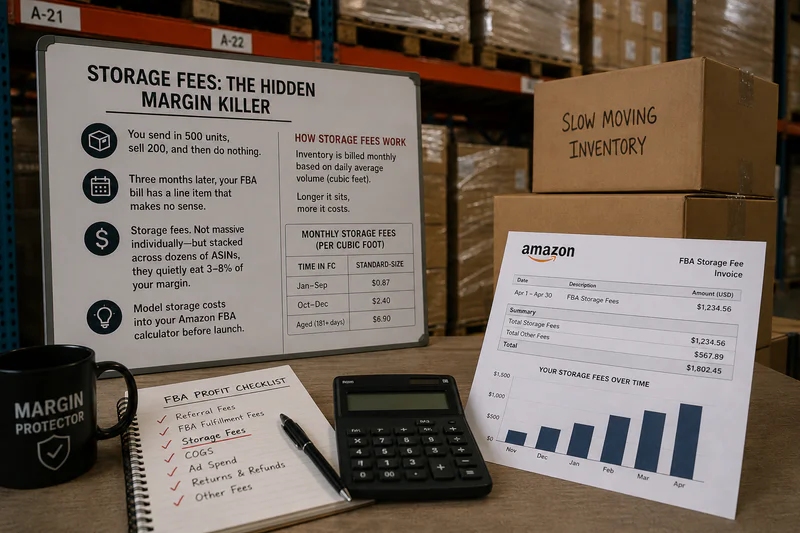
The Two Types of Storage Fees Amazon Charges
Amazon doesn't charge you one storage fee. There are two separate charges, and most sellers only know about one.
1. Monthly Storage Fees
These hit every month, assessed on the 15th, for inventory held during the previous month. The rate depends on product size and time of year.
Standard-size products:
January-September: $0.78 per cubic foot
October-December (peak season): $2.40 per cubic foot
Oversized products:
January-September: $0.56 per cubic foot
October-December: $1.40 per cubic foot
That 3x spike in Q4 catches a lot of sellers off guard. Stock up for Black Friday, fail to sell through fast enough, and you're paying triple the rate on leftover inventory through December.
2. Aged Inventory Surcharge (Long-Term Storage)
This is the one that really stings. Once your inventory hits 271 days in an Amazon fulfillment center, a surcharge kicks in - on top of the regular monthly fee.
The rates:
271–365 days: $3.80–$5.45 per cubic foot (varies by bracket)
365+ days: $6.90 per cubic foot, or $0.15 per unit - whichever is greater
A product sitting at 1 cubic foot for over a year isn't just costing you $0.78/month anymore. It's costing you $6.90 in aged inventory surcharge plus the monthly storage fee. On 100 units, that's a serious hit - before a single unit sells.
Amazon assesses this on the 15th of each month, same as regular storage fees. You won't get a separate warning.
The 271-Day Cliff Nobody Talks About
Most guides focus on the 365-day mark. That's a mistake. The real danger zone starts at 271 days.
Certain exempt categories - shoes, clothing, bags, watches, jewelry - have some protection. For general merchandise, the clock runs faster and the fee ramp is steep.
A product that costs you $15 to make, sitting in a warehouse for 280 days, is now bleeding an extra $5.45 per cubic foot per month. Layer the regular monthly fee on top, and you're approaching breakeven - or past it - before the item ships.
The correct move: use your amazon calculator estimates to model what happens if inventory sits for 90, 180, and 270 days - not just the initial sale scenario. Most sellers run exactly one scenario. That's the gap where margin disappears.
How Your IPI Score Affects Storage Costs
Amazon's Inventory Performance Index (IPI) score determines whether you face storage limits - and extra charges on top of everything else.
IPI below 500: Amazon restricts your storage capacity and adds a Storage Utilization Surcharge ranging from $0.87 to $10.00 per cubic foot, depending on how heavily you're using allocated space.
IPI above 500: No storage restrictions, no utilization surcharge.
Your IPI is calculated from four factors: excess inventory percentage, sell-through rate, stranded inventory, and in-stock rate. Every slow-moving ASIN drags your score down. Every unit sitting past 90 days without selling tells Amazon you're not managing inventory well - and they charge you for it.
5 Ways to Actually Cut Storage Fees
1. Ship in Smaller, More Frequent Batches
Sellers using just-in-time (JIT) inventory strategies reduce storage fees by 35–50% on average. Instead of sending 6 months of stock at once, send 60 days' worth and reorder based on actual velocity - not projections made pre-launch.
2. Target the 60-Day Supply Rule
60 days covers most stockout risk without loading you up with excess that ages past the 271-day threshold. Use your sales velocity data to set this, not gut feel. Amazon's Manage Inventory Health page gives you the current sell-through rate by ASIN.
3. Submit Removal Orders Before 271 Days
If an item isn't moving, don't wait. Removal costs $0.97–$1.78 per unit depending on size. That's almost always cheaper than paying the aged inventory surcharge for several months on slow-moving stock.
4. Move Slow Movers to FBM
Products selling fewer than 10 units per month often cost more in FBA storage than the FBA fulfillment fee saves you. For these SKUs, Fulfillment by Merchant (FBM) eliminates storage fees entirely. You hold the inventory, you control the cost.
5. Build Q4 Storage Into Your Amazon Calculator Model
Before your Q4 shipment, run the numbers. What's your storage cost at $2.40 per cubic foot if you sell through 70%? 50%? The amazon calculator includes a storage fee field - plug in the Q4 rate, not the standard rate, and see if your margin still holds. If it doesn't survive a 50% sell-through scenario, you're over-sending.
What the Amazon Calculator Doesn't Model By Default
The Amazon FBA Revenue Calculator shows you a snapshot: one unit, one sale, current fee rates. What it doesn't show:
What happens if that unit sits for 3 months before selling
The Q4 storage spike across your current inventory volume
The compounding effect of aged inventory surcharge across hundreds of units
You have to layer storage fee estimates on top manually. Build a simple model: units × average cubic feet × expected days to sell × applicable fee rate. Run it for best, base, and worst-case scenarios before you commit to a shipment size. Five minutes of modeling saves weeks of watching your margin erode.
The Bottom Line
Storage fees aren't Amazon's biggest cost line. But they're the most controllable. Fulfillment fees are fixed. Referral fees are fixed. Storage is directly tied to decisions you make about how much inventory to send and when.
Run the amazon calculator before every major shipment. Model the storage scenario, not just the sale scenario. Keep your sell-through rate healthy and your IPI above 500. Sellers who treat storage as a variable cost - not a sunk cost - consistently keep 2–4% more margin than the ones who don't.
Stop Estimating. Start Knowing
Start here with Sellerview.ai
FAQS
What is the Amazon long-term storage fee threshold?
Amazon's aged inventory surcharge kicks in when inventory has been stored for 271 days or more. Fees start at $3.80 per cubic foot and increase to $6.90 per cubic foot (or $0.15 per unit, whichever is greater) for inventory stored over 365 days. These charges apply on top of regular monthly storage fees.
How much are Amazon FBA monthly storage fees?
Standard-size products are charged $0.78 per cubic foot from January through September, and $2.40 per cubic foot during October through December (peak season). Oversized products are $0.56 and $1.40 per cubic foot respectively. Amazon assesses these on the 15th of each month.
How do I use the Amazon calculator to estimate storage costs?
The Amazon FBA Revenue Calculator includes a storage fee field. Enter your product dimensions, expected inventory level, and the applicable monthly rate. For Q4 planning, use $2.40 per cubic foot instead of the standard $0.78 to get an accurate margin picture before you commit to a shipment.
How do I avoid Amazon long-term storage fees?
Submit removal orders before your inventory hits 271 days in the fulfillment center. Removal costs $0.97-$1.78 per unit - often cheaper than months of aged inventory surcharges. You can also run price promotions to accelerate sell-through or switch slow-moving products to FBM to eliminate storage fees entirely.
What IPI score do I need to avoid Amazon storage surcharges?
Keep your Inventory Performance Index (IPI) above 500. Below that threshold, Amazon restricts your storage capacity and applies a Storage Utilization Surcharge of $0.87 to $10.00 per cubic foot. Your IPI is driven by sell-through rate, excess inventory, stranded inventory, and in-stock rate.