

Key Takeaways
• Five tools handle the actual sourcing and buying decision well: Tactical Arbitrage, Keepa, SellerAmp SAS, BuyBotPro, and RevSeller.
• 62% of retail arbitrage sellers earn less than $5,000 a month on Amazon, and 48% report profit margins under 20% (Jungle Scout).
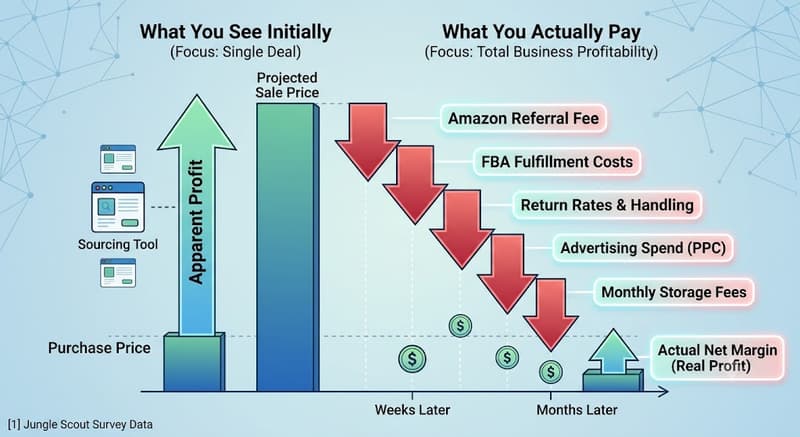
• A sourcing tool's ROI number only accounts for buy price and Amazon's upfront fees. It does not account for ad spend, returns, or storage fees that show up later.
• TACoS (Total Advertising Cost of Sale) is a more honest read on profitability than ACoS, because it measures ad spend against total sales, not just ad-driven sales.
• Sellerview.ai is not a sourcing tool. It's the SKU-level profit layer that tells you which sourced products are actually making money after ads, returns, and fees.
At a Glance
Retail arbitrage and online arbitrage both work the same way: you buy a product for less somewhere else and resell it on Amazon for more. Five tools handle the sourcing and buying decision well: Tactical Arbitrage, Keepa, SellerAmp SAS, BuyBotPro, and RevSeller. None of them tell you if the deals you're buying are still profitable after Amazon's fees, your ad spend, and your returns eat into the margin. That's a separate problem, and it's the one most arbitrage sellers never solve.
What Amazon Arbitrage and Online Sourcing Actually Cost You
Retail arbitrage and online arbitrage (OA) both work the same way. You find a product priced lower somewhere else, buy it, and resell it on Amazon for more. The margin is the gap between what you paid, what Amazon takes in referral fees and FBA fulfillment costs, and what the product actually sells for after returns and ad spend.
The tools below help you find and score deals faster. What most of them do not do is tell you whether your sourcing business is making real money once every fee, every return, and every dollar of PPC spend gets subtracted. Jungle Scout's survey data shows why that gap matters: 62 percent of retail arbitrage sellers on Amazon earn less than $5,000 a month, and 48 percent report profit margins under 20 percent [1]. Even among sellers who get a product listed and selling within weeks, a large share never find out whether the model is actually working until months later, when the storage fees, returns, and ad spend have already piled up.
That's not a reason to avoid arbitrage. It's a reason to separate two decisions that get treated as one: whether a deal is worth buying, and whether your sourcing business as a whole is profitable. The five tools in this list solve the first problem. None of them solve the second.
5 Best Amazon Seller Tools for Arbitrage and Online Sourcing
These five cover the sourcing and buying decision from different angles, budgets, and workflows. Pick based on how you source, not on which one has the longest feature list.
Tactical Arbitrage
Tactical Arbitrage scans more than 1,400 retail websites, including Walmart, Target, Best Buy, and regional chains, and flags which products can be resold on Amazon for a profit. It's built for sellers running online arbitrage and wholesale at volume, with features like Reverse Search and bulk list analysis for checking hundreds of ASINs at once. Plans run from $59 to $159 a month depending on how many concurrent searches you need, with a 7-day free trial to start [2].
Keepa
Keepa tracks price history, sales rank, and Buy Box ownership for every product on Amazon and overlays that data as a chart on the product page itself. It's close to an industry standard, most other sourcing tools on this list actually pull Keepa's data into their own interface. The Chrome extension has a permanently free tier, and the Premium plan runs about $20 a month for full historical charts and Buy Box statistics [3].
SellerAmp SAS
SellerAmp SAS, short for Sourcing Analysis Simplified, bundles a profit calculator, IP and eligibility alerts, and historical price and sales charts into one subscription that works as a web app, Chrome extension, and mobile app. Plans start at $19.95 a month with a 14-day free trial [4]. It's built specifically for arbitrage and wholesale sourcing decisions, not for private label product research.
BuyBotPro
BuyBotPro automates the due diligence most sellers do by hand. It scores each deal out of 100 based on ROI, sales rank, IP risk, and Buy Box competition in a few seconds, and it includes a free mobile scanning app called BuyBotGo for in-store retail arbitrage. Pricing runs $34.95 to $44.95 a month, and BuyBotPro offers a 30-day free trial [5][6].
RevSeller
RevSeller is a lightweight Chrome extension that shows margin, sales rank history, and category-level profit indicators directly on the Amazon product page. It doesn't have the automation or mobile app that BuyBotPro and SellerAmp SAS offer, but it's a low-cost way to check the basics before you buy. RevSeller costs $99.99 a year and offers a 30-day free trial with no credit card required [7].
Where Sellerview.ai Fits (It's Not a Sourcing Tool)
Sellerview.ai is not a sourcing tool, and it shouldn't replace any of the five above. It picks up where they leave off. Once you've bought and listed a product, Sellerview.ai tracks true SKU-level profit and loss, including Amazon fees, ad spend, COGS, and returns, so you can see which sourced products are actually making money and which ones are quietly losing it every month.
Comparison: Sourcing Tools vs. Sellerview.ai
Why Sourcing Tools Don't Show You Real Profit
A sourcing tool's ROI number is a snapshot taken at the moment you decide to buy. It usually accounts for the buy price, the referral fee, and the FBA fulfillment fee. What it cannot see is what happens after: how much you spend on ads to keep the listing ranked, how many units come back as returns, or how storage fees creep up if the product sits longer than expected.
This is where TACoS, or Total Advertising Cost of Sale, matters more than ACoS. ACoS only measures ad spend against ad-driven sales. TACoS measures ad spend against total sales, organic and paid combined, which gives you a far more honest read on whether a product is actually profitable once you account for everything you're spending to move it. A product with a great sourcing ROI on paper can still be a loser after three months of ad spend and returns eat into that margin.
Sellerview.ai is built to answer exactly this question at the SKU level, not just at the account level. Instead of guessing whether last month's arbitrage buys paid off, you can see the real number, product by product, before you decide whether to reorder.
What Each Tool Actually Tells You
How to Pick the Right Sourcing Tool for Your Business
Start with three questions instead of a feature list.
1. How many searches do you run a week? If you're scanning hundreds of ASINs across dozens of retailers, Tactical Arbitrage's volume plans make sense. If you're checking a handful of products a day, that scale is wasted money.
2. Are you buying in-store or online? BuyBotPro's mobile app and SellerAmp SAS's mobile app are built for retail arbitrage, standing in an aisle with your phone out. If you source entirely from your laptop, that mobile layer matters less.
3. What's your monthly tool budget before you've proven the model works? Keepa's free tier and RevSeller's low annual cost let you test the waters without much risk. Upgrade once your sourcing volume actually justifies it.
None of these tools replace the step that actually protects your margin: knowing your real profit after the sale, not just your estimated ROI before it.
The Bottom Line
The best Amazon seller tools for arbitrage and online sourcing get you to a buying decision faster. Tactical Arbitrage, Keepa, SellerAmp SAS, BuyBotPro, and RevSeller each do that job well, at different price points and for different sourcing styles. But a fast buying decision isn't the same as a profitable one. Sellerview.ai is where you find out which of your sourced products are actually making you money after ads, returns, and fees.
FAQ
What are the best Amazon seller tools for arbitrage and online sourcing?
For sourcing and evaluating deals, Tactical Arbitrage, Keepa, SellerAmp SAS, BuyBotPro, and RevSeller cover most workflows and budgets. None of them track whether your sourcing business is profitable after ads, returns, and fees; that's a separate job handled by a profit-tracking tool like Sellerview.ai.
Is Tactical Arbitrage or Keepa better for online arbitrage?
They solve different problems. Tactical Arbitrage actively searches over 1,400 retail sites to find deals for you. Keepa shows price and sales rank history for a product you've already found. Many sellers use both, since Keepa's data often feeds into the deal scores other tools calculate.
Do I need a paid sourcing tool to start Amazon arbitrage?
No. Keepa's free tier and the free Amazon Seller App cover the basics. Paid tools like SellerAmp SAS or BuyBotPro save time by automating the profit and IP checks you'd otherwise do by hand, which matters more once you're evaluating dozens of deals a week.
How do I know if my arbitrage business is actually profitable?
Your sourcing tool's ROI estimate only reflects the buy price and Amazon's upfront fees at the moment of purchase. To know real profitability, you need SKU-level tracking of ad spend, returns, and storage fees after the sale, which is what Sellerview.ai is built to show.
What's the difference between a sourcing tool and a profit tracking tool?
A sourcing tool answers "should I buy this?" before you spend money. A profit tracking tool answers "did that purchase actually make me money?" after ads, returns, and fees are accounted for. Arbitrage sellers typically need both, not one or the other.
How much does it cost to get started with Amazon arbitrage tools?
You can start for free with Keepa's free tier and the Amazon Seller App. Paid sourcing tools range from about $20 a month (SellerAmp SAS) to $159 a month (Tactical Arbitrage's top tier), depending on volume and automation needs.
Sources
[1] Jungle Scout, Amazon Business Models & Types of Seller Accounts : https://www.junglescout.com/resources/articles/amazon-business-models/
[2] Tactical Arbitrage pricing, RevenueGeeks : https://revenuegeeks.com/tactical-arbitrage-price/
[3] Keepa pricing, JordiOB : https://jordiob.com/amazon-tools/guides/keepa-pricing/
[4] SellerAmp SAS pricing, official site : https://selleramp.com/pricing/
[5] BuyBotPro, official site (30-day free trial) : https://www.buybotpro.com/
[6] BuyBotPro & RevSeller pricing, The Selling Guys : https://www.thesellingguys.com/tools-supplies-use-succeed-amazon-fba/
[7] RevSeller pricing and free trial, The Selling Guys : https://www.thesellingguys.com/tools-supplies-use-succeed-amazon-fba/