
Most sellers check their ACoS and either panic because it's "too high" or feel great because it's "low." Both reactions are usually wrong. ACoS without context is just noise — and making bid decisions based on it alone is one of the fastest ways to quietly bleed profit on Amazon.
What is ACoS?
ACoS stands for Advertising Cost of Sales. It measures how much you're spending on ads for every dollar of revenue those ads directly generate.
Formula: ACoS = (Ad Spend ÷ Ad Revenue) × 100
If you spent $200 on a Sponsored Products campaign and it generated $800 in sales, your ACoS is 25%.
Amazon shows you ACoS inside Seller Central's Campaign Manager and the Advertising Console. It's calculated per campaign, per ad group, and per keyword — which is where it gets genuinely useful, as you'll see.
The key word in the definition is directly. ACoS only counts revenue Amazon can attribute to an ad click. It doesn't count organic sales that happen because your PPC improved your keyword rank. That's why ACoS alone never tells the full story.
How ACoS Works on Amazon
ACoS is calculated in real time across all your sponsored ad types: Sponsored Products, Sponsored Brands, and Sponsored Display. Each click costs you a CPC (cost-per-click), and when that click converts into a sale, Amazon tracks the revenue and calculates your ACoS.
Here's a concrete example with numbers:
Product price: $45
Ad spend this week: $315
Ad-attributed revenue: $1,125
ACoS: ($315 ÷ $1,125) × 100 = 28%
That 28% means for every dollar in ad sales, you spent 28 cents on ads. Whether 28% is good or catastrophic depends entirely on your margins — not on some industry average you read in a blog post.
Average CPCs on Amazon hit $1.12 in 2025, up 15.5% year-over-year, and are trending toward $1.18–$1.25 through 2026. More competition, higher click costs, thinner room for error. That's the environment you're operating in right now.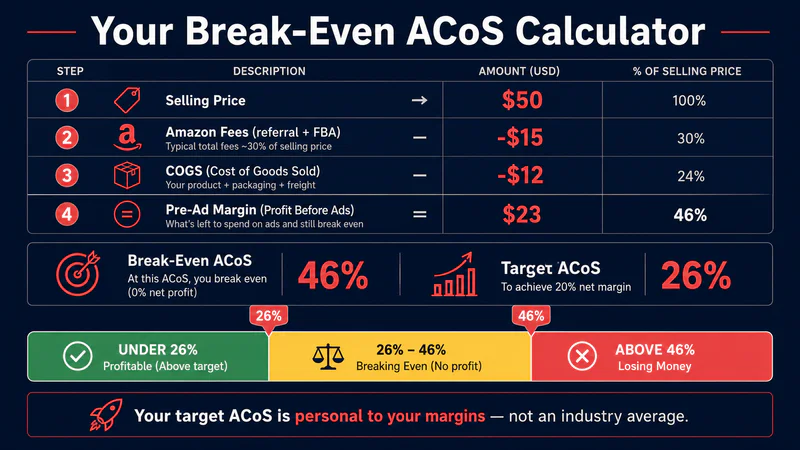
Why ACoS Matters for Your Profitability
Here's the framework every seller needs to understand:
Break-even ACoS = Your pre-advertising profit margin
If your product has a 35% margin before ad spend, then a 35% ACoS means you break even on ads — you made zero from that advertising. Not a loss, but not a win either.
Let's build the full math:
Selling price: $50
COGS: $12
Pre-ad margin: $23 ÷ $50 = 46%
Break-even ACoS: 46%
Target ACoS (to keep 20% net margin): 46% − 20% = 26%
That 26% is your actual target — not 15%, not 30%, not whatever someone told you is "good." Your break-even ACoS is personal to your product's economics.
Revenue − Amazon fees − COGS − returns − ad spend = actual profit
Every point of unnecessary ACoS above your target is a direct deduction from that final number.
ACoS vs. ROAS: 20% ACoS = 5x ROAS | 25% ACoS = 4x ROAS | 33% ACoS = 3x ROAS | 50% ACoS = 2x ROAS
Common Mistakes Sellers Make with ACoS
1. Treating a universal good ACoS as gospel
The most repeated advice in Amazon PPC is "keep ACoS under 25%." For a product with 15% margins, that advice will bankrupt you. For a product with 60% margins on a launch phase, refusing to spend above 25% will kill your ranking before you have a chance to build organic velocity. Your target ACoS must come from your own P&L — nothing else.
2. Optimizing ACoS without knowing your break-even
Sellers obsessively lower bids to reduce ACoS without ever calculating what their break-even is. If your break-even ACoS is 42% and you've pushed your ACoS down to 18%, you've probably also destroyed your impression share, ranking, and organic sales. Congrats on a metric that looks great in a screenshot — your total business is declining.
3. Mixing brand and non-brand keywords in the same campaign
Brand keywords almost always have ACoS of 5–12% because searchers already know and want your product. Non-brand keywords often run 30–50%+ during competitive phases. When you mix them, the brand ACoS masks the non-brand ACoS. You think your campaign is efficient. It isn't — half of it is.
4. Ignoring ACoS at the keyword level
Account-level ACoS is a vanity number. A campaign averaging 28% might have three keywords running at 8% and two running at 85%. The two runaway keywords are funding your averages into a false sense of control. Pull keyword-level ACoS weekly and act on it.
How to Use ACoS the Right Way
Step 1: Calculate your break-even ACoS before touching any campaigns. Take your net margin before advertising. That number is your absolute ceiling. Running above it consistently means ads are costing you money.
Step 2: Set a target ACoS based on your business goal.
Profitability phase (mature product, stable rank): target = break-even minus desired profit margin
Launch or ranking phase: target can be at or above break-even for 30–60 days while you build organic rank
Defense (protecting rank from competitors): target slightly below break-even is acceptable
Step 3: Segment campaigns by keyword intent. Branded terms, competitor terms, and category terms all have different conversion rates and therefore different acceptable ACoS levels. Don't manage them together.
Step 4: Pull keyword-level ACoS weekly. Any keyword running more than 2x your target ACoS for 14+ days with no signs of converting deserves a bid cut or pause. Keywords running at 50% or less of your target with strong sales volume deserve more budget.
Step 5: Track ACoS alongside TACoS. TACoS (Total Advertising Cost of Sales = ad spend ÷ total revenue) tells you what ads cost relative to the whole business. If ACoS is 35% but TACoS is 10%, your ads are working exactly as they should.
How Sellerview Helps You Track ACoS
Sellerview.ai shows you ACoS broken down by SKU alongside your actual net margin — so you can see in one view whether your ACoS is above or below break-even without manually pulling numbers from three different reports.
Stop guessing at a "good" ACoS and start working from your actual margin. Run the break-even math on every ASIN you're advertising, set a real target, and manage at the keyword level — not the account level.
See your real profit on Sellerview.ai → free trial, no credit card needed.
The break-even ACoS number only matters if your underlying profit margin is accurate. Use Sellerview's free Amazon Profit Calculator to get your real margin per SKU — fees, COGS, ad spend, and returns all included — then set your ACoS target from a number you can actually trust. Try it free at Sellerview.ai.